Introduction
Task Management Tools are software platforms designed to help individuals and teams organize, track, and complete tasks efficiently. These tools allow users to assign tasks, set deadlines, monitor progress, and collaborate in real time, ensuring that work is completed on schedule and without confusion.
In modern workplaces where teams are distributed and workloads are dynamic, task management tools play a critical role in maintaining productivity and accountability. From simple to-do lists to advanced workflow systems, these tools help streamline operations and reduce manual coordination efforts.
Common use cases include:
- Daily task tracking and to-do management
- Team collaboration and task assignment
- Deadline and priority management
- Workflow automation
- Productivity tracking
What buyers should evaluate:
- Ease of use and user interface
- Task organization features (lists, boards, timelines)
- Collaboration capabilities
- Automation and reminders
- Integration with other tools
- Scalability
- Security features
- Pricing and value
Best for: Individuals, freelancers, startups, teams, and enterprises managing structured or recurring work.
Not ideal for: Teams needing only basic note-taking or minimal task tracking.
Key Trends in Task Management Tools
- AI-powered task prioritization and scheduling
- Automation for repetitive tasks and workflows
- Integration with collaboration and communication tools
- Real-time collaboration for remote teams
- Cross-platform accessibility
- Visual task tracking (Kanban, timelines)
- Focus on productivity analytics
- Mobile-first task management experiences
How We Selected These Tools (Methodology)
- Market popularity and adoption
- Feature completeness for task management
- Reliability and performance
- Integration ecosystem
- Security capabilities
- Ease of use across different users
- Innovation in automation and AI
- Customer feedback and usability
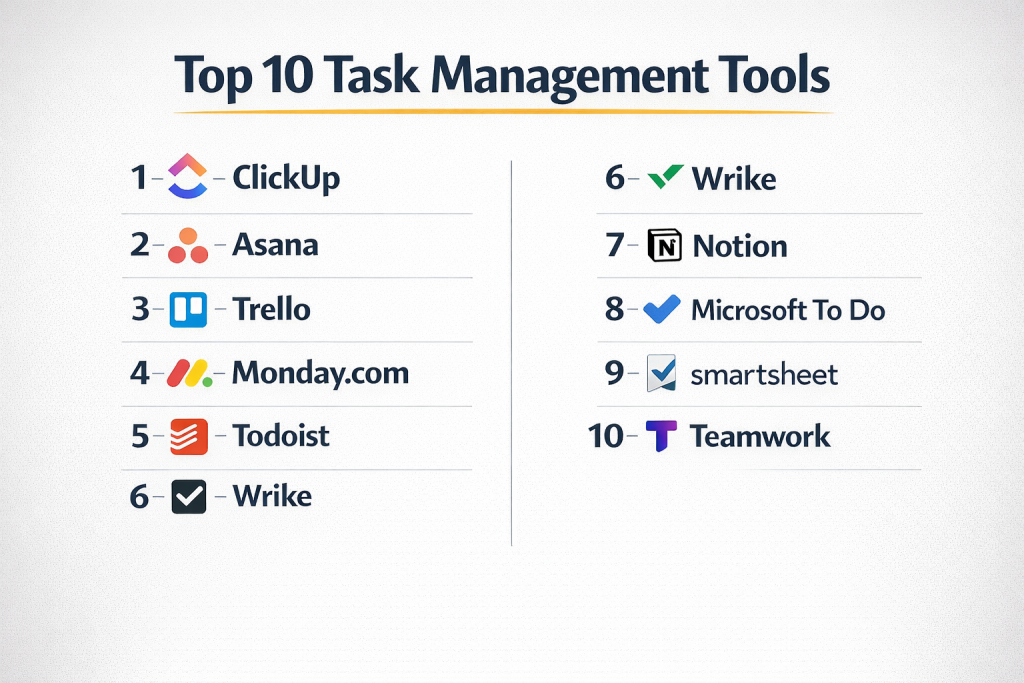
Top 10 Task Management Tools
#1 — ClickUp
Short description: All-in-one productivity platform offering powerful task management and workflow customization.
Key Features
- Task hierarchies and subtasks
- Kanban and list views
- Time tracking
- Automation workflows
- Goal tracking
Pros
- Feature-rich platform
- Highly customizable
Cons
- Learning curve
- Complex UI
Platforms / Deployment
Web / Mobile / Cloud
Security & Compliance
Not publicly stated
Integrations & Ecosystem
- Productivity tools
- APIs
Support & Community
Active community and support
#2 — Asana
Short description: User-friendly tool for organizing tasks, projects, and team collaboration.
Key Features
- Task tracking
- Workflow automation
- Timeline view
- Reporting dashboards
- Team collaboration
Pros
- Easy to use
- Flexible workflows
Cons
- Limited advanced features
- Pricing tiers
Platforms / Deployment
Web / Mobile / Cloud
Security & Compliance
Not publicly stated
Integrations & Ecosystem
- CRM tools
- Collaboration apps
Support & Community
Strong support
#3 — Trello
Short description: Visual Kanban-based tool ideal for simple task tracking and team collaboration.
Key Features
- Drag-and-drop boards
- Task cards
- Automation
- Collaboration tools
- Workflow visualization
Pros
- Very simple interface
- Flexible
Cons
- Limited advanced features
- Not ideal for large teams
Platforms / Deployment
Web / Mobile / Cloud
Security & Compliance
Not publicly stated
Integrations & Ecosystem
- Productivity tools
- APIs
Support & Community
Strong community
#4 — Monday.com
Short description: Work management platform with customizable task workflows and automation.
Key Features
- Custom workflows
- Automation
- Dashboards
- Collaboration
- Reporting
Pros
- Visual interface
- Highly customizable
Cons
- Expensive at scale
- Learning curve
Platforms / Deployment
Web / Mobile / Cloud
Security & Compliance
Not publicly stated
Integrations & Ecosystem
- CRM tools
- APIs
Support & Community
Good support
#5 — Todoist
Short description: Simple and powerful task manager for personal and team productivity.
Key Features
- Task lists
- Priority levels
- Recurring tasks
- Natural language input
- Reminders
Pros
- Easy to use
- Lightweight
Cons
- Limited collaboration features
- Basic reporting
Platforms / Deployment
Web / Mobile / Cloud
Security & Compliance
Not publicly stated
Integrations & Ecosystem
- Productivity apps
- APIs
Support & Community
Strong user base
#6 — Wrike
Short description: Flexible task management tool for teams needing advanced workflows and reporting.
Key Features
- Task tracking
- Workflow automation
- Reporting dashboards
- Collaboration tools
- Resource management
Pros
- Strong reporting
- Flexible workflows
Cons
- Complex UI
- Pricing tiers
Platforms / Deployment
Web / Mobile / Cloud
Security & Compliance
Not publicly stated
Integrations & Ecosystem
- Business tools
- APIs
Support & Community
Professional support
#7 — Notion
Short description: All-in-one workspace combining notes, tasks, and databases.
Key Features
- Task databases
- Templates
- Collaboration
- Notes and docs
- Custom workflows
Pros
- Highly flexible
- All-in-one solution
Cons
- Setup takes time
- Can feel unstructured
Platforms / Deployment
Web / Mobile / Cloud
Security & Compliance
Not publicly stated
Integrations & Ecosystem
- Productivity tools
- APIs
Support & Community
Strong community
#8 — Microsoft To Do
Short description: Simple task management tool integrated with Microsoft ecosystem.
Key Features
- Task lists
- Reminders
- Due dates
- Subtasks
- Cross-device sync
Pros
- Free and simple
- Integration with Microsoft
Cons
- Limited features
- Not ideal for teams
Platforms / Deployment
Web / Mobile / Cloud
Security & Compliance
Not publicly stated
Integrations & Ecosystem
- Microsoft apps
Support & Community
Basic support
#9 — Smartsheet
Short description: Spreadsheet-style task management tool for structured workflows.
Key Features
- Task tracking
- Automation
- Reporting
- Templates
- Collaboration
Pros
- Familiar interface
- Strong reporting
Cons
- Limited Agile features
- Learning curve
Platforms / Deployment
Web / Mobile / Cloud
Security & Compliance
Not publicly stated
Integrations & Ecosystem
- Business tools
- APIs
Support & Community
Good support
#10 — Teamwork
Short description: Task management tool designed for teams handling client projects and collaboration.
Key Features
- Task tracking
- Time tracking
- Collaboration
- Reporting
- Project planning
Pros
- Great for client work
- Strong collaboration
Cons
- Complex setup
- Pricing tiers
Platforms / Deployment
Web / Mobile / Cloud
Security & Compliance
Not publicly stated
Integrations & Ecosystem
- Business tools
- APIs
Support & Community
Reliable support
Comparison Table (Top 10)
| Tool Name | Best For | Platform(s) Supported | Deployment | Standout Feature | Public Rating |
|---|---|---|---|---|---|
| ClickUp | All-in-one teams | Web/Mobile | Cloud | Feature-rich | N/A |
| Asana | Flexible teams | Web/Mobile | Cloud | Ease of use | N/A |
| Trello | Beginners | Web/Mobile | Cloud | Kanban boards | N/A |
| Monday.com | Custom workflows | Web/Mobile | Cloud | Visual dashboards | N/A |
| Todoist | Personal productivity | Web/Mobile | Cloud | Simplicity | N/A |
| Wrike | Mid-market | Web/Mobile | Cloud | Reporting | N/A |
| Notion | All-in-one workspace | Web/Mobile | Cloud | Flexibility | N/A |
| Microsoft To Do | Personal use | Web/Mobile | Cloud | Integration | N/A |
| Smartsheet | Structured teams | Web/Mobile | Cloud | Spreadsheet style | N/A |
| Teamwork | Client projects | Web/Mobile | Cloud | Collaboration | N/A |
Evaluation & Scoring of Task Management Tools
| Tool Name | Core (25%) | Ease (15%) | Integrations (15%) | Security (10%) | Performance (10%) | Support (10%) | Value (15%) | Weighted Total |
|---|---|---|---|---|---|---|---|---|
| ClickUp | 9 | 7 | 8 | 7 | 8 | 7 | 9 | 8.2 |
| Asana | 8 | 9 | 8 | 7 | 8 | 8 | 7 | 8.1 |
| Trello | 7 | 9 | 7 | 6 | 7 | 7 | 8 | 7.6 |
| Monday.com | 8 | 8 | 8 | 7 | 8 | 8 | 7 | 8.0 |
| Todoist | 7 | 9 | 6 | 6 | 7 | 7 | 8 | 7.4 |
| Wrike | 8 | 7 | 8 | 7 | 8 | 8 | 7 | 7.9 |
| Notion | 8 | 7 | 7 | 6 | 7 | 7 | 8 | 7.6 |
| Microsoft To Do | 6 | 9 | 6 | 6 | 7 | 6 | 9 | 7.2 |
| Smartsheet | 7 | 7 | 7 | 7 | 8 | 7 | 7 | 7.4 |
| Teamwork | 8 | 7 | 8 | 7 | 8 | 7 | 7 | 7.8 |
Scores are comparative and indicate overall balance across usability, features, and value.
Which Task Management Tool Is Right for You?
Solo / Freelancer
Todoist or Microsoft To Do
SMB
ClickUp or Asana
Mid-Market
Monday.com or Wrike
Enterprise
ClickUp or Smartsheet
Budget vs Premium
Budget tools are simple; premium tools offer automation
Feature Depth vs Ease of Use
Simple tools are easier; advanced tools need training
Integrations & Scalability
Advanced tools offer better integrations
Security & Compliance Needs
Large teams should prioritize secure platforms
Frequently Asked Questions (FAQs)
What are task management tools?
They help organize, assign, and track tasks efficiently.
Are they different from project management tools?
Yes, task tools focus on individual tasks rather than full projects.
Which tool is best for personal use?
Todoist and Microsoft To Do are great options.
Do these tools support collaboration?
Yes, most tools support team collaboration.
Are they expensive?
Pricing varies depending on features.
Can I automate tasks?
Yes, many tools offer automation features.
Do they integrate with other apps?
Yes, integrations are widely supported.
Are they secure?
Security varies by platform.
Can I switch tools easily?
Depends on data export and integrations.
What are alternatives?
Basic to-do apps and spreadsheets.
Conclusion
Task management tools have become essential for improving productivity, organizing work, and ensuring tasks are completed on time. While powerful platforms like ClickUp and Monday.com offer advanced features and automation, simpler tools such as Todoist and Microsoft To Do provide ease of use for individuals and small teams. There is no single best tool, as the right choice depends on your workflow, team size, and complexity of tasks. It is important to evaluate tools based on usability, integrations, and scalability before making a decision. Shortlisting a few tools and testing them in real-world scenarios can help identify the best fit. Choosing the right tool ultimately leads to better efficiency and smoother task execution.