Introduction
Robotic Process Automation (RPA) refers to software tools that automate repetitive, rule-based tasks by mimicking human interactions with digital systems. These tools use bots to perform activities such as data entry, form filling, report generation, and system navigation—without requiring major changes to existing infrastructure.
In modern organizations, RPA plays a critical role in improving efficiency, reducing operational costs, and minimizing human errors. With the addition of AI capabilities, RPA platforms are now evolving into intelligent automation systems capable of handling semi-structured data and decision-making processes.
Common Use Cases
- Data entry and processing
- Invoice and finance automation
- Customer service workflows
- HR onboarding processes
- IT operations automation
What Buyers Should Evaluate
- Ease of bot development (no-code vs low-code)
- Scalability and orchestration capabilities
- Integration with existing systems
- AI and intelligent automation features
- Security and compliance controls
- Monitoring and analytics
- Deployment flexibility
- Pricing and licensing
Best for: Enterprises, operations teams, finance departments, HR teams, and organizations handling high-volume repetitive processes.
Not ideal for: Small teams with minimal repetitive tasks or processes requiring high levels of human judgment.
Key Trends in RPA
- Shift toward intelligent automation (RPA + AI)
- Adoption of hyperautomation strategies
- Integration with AI/ML for document processing
- Growth of cloud-based RPA platforms
- Expansion of citizen developer tools
- Increased focus on process discovery tools
- Integration with workflow automation platforms
- Real-time analytics and monitoring dashboards
- Use of bots for customer support automation
- Enhanced security and governance frameworks
How We Selected These Tools (Methodology)
- Market adoption and enterprise usage
- Feature completeness across automation lifecycle
- Ease of use for business and technical users
- Integration capabilities with enterprise systems
- Performance and scalability signals
- Security and compliance readiness
- Innovation in AI and automation
- Support and community strength
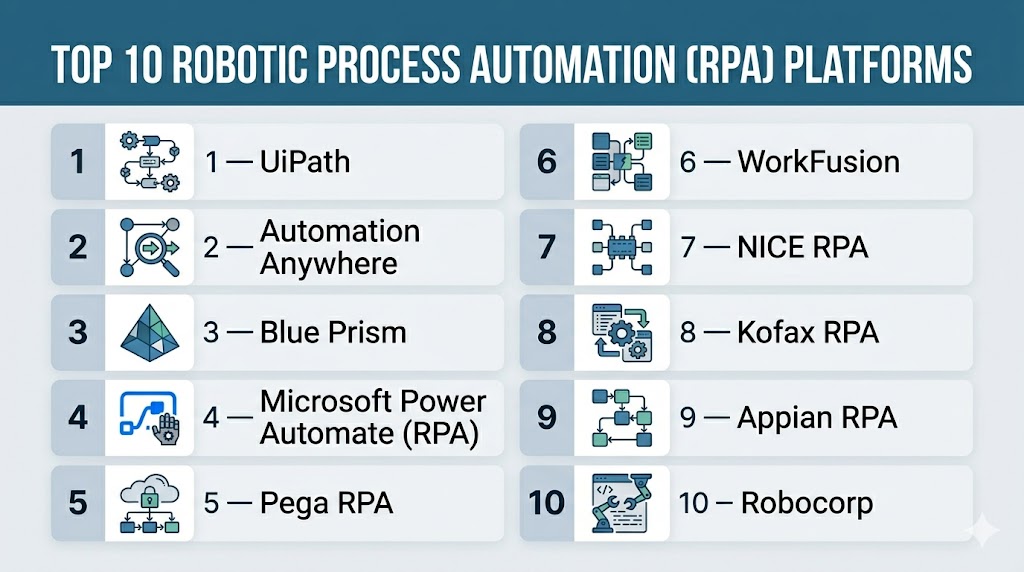
Top 10 Robotic Process Automation (RPA) Platforms
#1 — UiPath
Short description: A leading RPA platform offering end-to-end automation with strong AI capabilities.
Key Features
- Drag-and-drop automation builder
- AI-powered document processing
- Bot orchestration
- Process mining
- Analytics dashboards
Pros
- Comprehensive feature set
- Strong community
Cons
- Pricing complexity
- Learning curve
Platforms / Deployment
Cloud / On-premise / Hybrid
Security & Compliance
Enterprise-grade security, RBAC
Integrations & Ecosystem
UiPath integrates with enterprise systems and applications.
- ERP systems
- CRM platforms
- APIs
Support & Community
Large global community and enterprise support
#2 — Automation Anywhere
Short description: A cloud-native RPA platform focused on scalable enterprise automation.
Key Features
- Bot automation
- Cloud-native architecture
- AI integration
- Analytics tools
- Process discovery
Pros
- Scalable
- Strong AI capabilities
Cons
- Expensive
- Setup complexity
Platforms / Deployment
Cloud
Security & Compliance
Encryption, access control
Integrations & Ecosystem
- Enterprise systems
- APIs
Support & Community
Enterprise-level support
#3 — Blue Prism
Short description: A robust enterprise RPA platform designed for secure and scalable automation.
Key Features
- Digital workforce management
- Process automation
- Centralized control
- Security features
- Scalability tools
Pros
- Highly secure
- Enterprise-ready
Cons
- Less user-friendly
- High cost
Platforms / Deployment
On-premise / Cloud
Security & Compliance
Enterprise-grade governance
Integrations & Ecosystem
- Enterprise apps
- APIs
Support & Community
Strong enterprise support
#4 — Microsoft Power Automate (RPA)
Short description: A low-code automation tool with RPA capabilities integrated into the Microsoft ecosystem.
Key Features
- Desktop and cloud automation
- AI builder
- Workflow automation
- Integration with Microsoft tools
- Pre-built templates
Pros
- Easy to use
- Strong Microsoft integration
Cons
- Limited outside ecosystem
- Licensing complexity
Platforms / Deployment
Cloud / Desktop
Security & Compliance
Enterprise-grade security
Integrations & Ecosystem
- Microsoft 365
- Azure services
Support & Community
Large enterprise support network
#5 — Pega RPA
Short description: An intelligent automation platform combining RPA with workflow and AI capabilities.
Key Features
- Intelligent automation
- Process orchestration
- AI decisioning
- Workflow management
- Analytics
Pros
- Strong AI integration
- Scalable
Cons
- Complex
- Expensive
Platforms / Deployment
Cloud / On-premise
Security & Compliance
Enterprise-grade security
Integrations & Ecosystem
- Enterprise systems
- APIs
Support & Community
Enterprise support
#6 — WorkFusion
Short description: An AI-driven RPA platform focused on intelligent automation and document processing.
Key Features
- AI-based automation
- Document processing
- Workflow automation
- Analytics
- Pre-trained bots
Pros
- Strong AI capabilities
- Good for finance use cases
Cons
- Limited flexibility
- Smaller ecosystem
Platforms / Deployment
Cloud
Security & Compliance
Not publicly stated
Integrations & Ecosystem
- APIs
- Enterprise tools
Support & Community
Moderate support
#7 — NICE RPA
Short description: A platform designed for customer service automation and back-office processes.
Key Features
- Attended and unattended bots
- Process automation
- Analytics
- Workflow tools
- Integration capabilities
Pros
- Strong in CX automation
- Scalable
Cons
- Complex setup
- Cost considerations
Platforms / Deployment
Cloud / On-premise
Security & Compliance
Not publicly stated
Integrations & Ecosystem
- CRM systems
- Customer support tools
Support & Community
Enterprise support
#8 — Kofax RPA
Short description: A platform combining RPA with document automation and data capture.
Key Features
- Process automation
- Document capture
- Data extraction
- Workflow tools
- Analytics
Pros
- Strong document automation
- Enterprise-ready
Cons
- Complex
- Pricing varies
Platforms / Deployment
Cloud / On-premise
Security & Compliance
Not publicly stated
Integrations & Ecosystem
- Enterprise systems
- APIs
Support & Community
Enterprise support
#9 — Appian RPA
Short description: A low-code automation platform combining RPA with process management.
Key Features
- Low-code automation
- Workflow integration
- Process orchestration
- AI capabilities
- Analytics
Pros
- Unified automation platform
- Strong scalability
Cons
- Learning curve
- Pricing
Platforms / Deployment
Cloud
Security & Compliance
Enterprise-grade security
Integrations & Ecosystem
- APIs
- Business apps
Support & Community
Strong enterprise support
#10 — Robocorp
Short description: A developer-focused RPA platform built on open-source tools.
Key Features
- Python-based automation
- Open-source framework
- Cloud orchestration
- Automation tools
- Developer flexibility
Pros
- Developer-friendly
- Open-source flexibility
Cons
- Requires coding
- Smaller ecosystem
Platforms / Deployment
Cloud / Self-hosted
Security & Compliance
Not publicly stated
Integrations & Ecosystem
- APIs
- Developer tools
Support & Community
Growing open-source community
Comparison Table (Top 10)
| Tool Name | Best For | Platform(s) Supported | Deployment | Standout Feature | Public Rating |
|---|---|---|---|---|---|
| UiPath | Enterprise | Web/Desktop | Cloud/Hybrid | AI automation | N/A |
| Automation Anywhere | Cloud RPA | Web | Cloud | Scalability | N/A |
| Blue Prism | Security | Web | Cloud/On-prem | Governance | N/A |
| Power Automate | Microsoft users | Web/Desktop | Cloud | Ease of use | N/A |
| Pega | Intelligent automation | Web | Cloud/On-prem | AI decisioning | N/A |
| WorkFusion | AI automation | Web | Cloud | Document AI | N/A |
| NICE | CX automation | Web | Cloud/On-prem | Customer workflows | N/A |
| Kofax | Document automation | Web | Cloud/On-prem | Data capture | N/A |
| Appian | Low-code RPA | Web | Cloud | Process orchestration | N/A |
| Robocorp | Developers | CLI/Web | Cloud/Self-hosted | Open-source | N/A |
Evaluation & Scoring of RPA Platforms
| Tool Name | Core (25%) | Ease (15%) | Integrations (15%) | Security (10%) | Performance (10%) | Support (10%) | Value (15%) | Weighted Total |
|---|---|---|---|---|---|---|---|---|
| UiPath | 10 | 8 | 9 | 9 | 9 | 9 | 7 | 8.9 |
| Automation Anywhere | 9 | 7 | 9 | 8 | 9 | 8 | 7 | 8.5 |
| Blue Prism | 9 | 6 | 8 | 9 | 9 | 8 | 6 | 8.3 |
| Power Automate | 8 | 9 | 8 | 8 | 8 | 8 | 8 | 8.3 |
| Pega | 9 | 6 | 9 | 9 | 8 | 8 | 6 | 8.2 |
| WorkFusion | 8 | 7 | 7 | 7 | 8 | 7 | 7 | 7.6 |
| NICE | 8 | 7 | 8 | 7 | 8 | 7 | 7 | 7.7 |
| Kofax | 8 | 7 | 8 | 7 | 8 | 7 | 7 | 7.7 |
| Appian | 8 | 7 | 8 | 8 | 8 | 8 | 7 | 7.9 |
| Robocorp | 7 | 6 | 7 | 6 | 7 | 7 | 9 | 7.2 |
How to interpret scores:
- Enterprise tools lead in features and security
- Low-code tools excel in usability
- Open-source tools offer better flexibility and cost efficiency
- Scores are comparative, not absolute
Which RPA Platform Is Right for You?
Solo / Freelancer
- Best: Robocorp
- Developer-focused automation
SMB
- Best: Power Automate
- Easy and cost-effective
Mid-Market
- Best: UiPath, Automation Anywhere
- Balanced scalability and features
Enterprise
- Best: UiPath, Blue Prism, Pega
- High governance and scalability
Budget vs Premium
- Budget: Robocorp
- Premium: UiPath, Automation Anywhere
Feature Depth vs Ease of Use
- Advanced: UiPath, Pega
- Easy: Power Automate
Integrations & Scalability
- Strong: UiPath, Automation Anywhere
- Moderate: WorkFusion
Security & Compliance Needs
- Enterprise: Blue Prism, UiPath
- Basic: Open-source tools
Frequently Asked Questions (FAQs)
What is RPA?
It is software that automates repetitive tasks using bots.
Why use RPA?
To improve efficiency and reduce manual work.
Is RPA the same as AI?
No, but modern RPA integrates AI capabilities.
Can RPA scale?
Yes, enterprise platforms support large-scale automation.
Do I need coding skills?
Some tools are no-code, others require programming.
Is RPA secure?
Yes, enterprise tools offer strong security features.
Can RPA integrate with APIs?
Yes, most platforms support integrations.
What industries use RPA?
Finance, healthcare, retail, and IT widely use RPA.
How long does implementation take?
It depends on complexity—from days to months.
What are alternatives?
Workflow automation or custom scripting solutions.
Conclusion
Robotic Process Automation platforms are essential for automating repetitive tasks and improving operational efficiency across organizations. From no-code tools to enterprise-grade intelligent automation platforms, each solution serves different levels of complexity and scale. The right choice depends on your business processes, technical expertise, and scalability needs. Focus on platforms that offer strong integrations, AI capabilities, and governance features. Start by testing a few tools to identify the best fit for your automation strategy.