Introduction
Electronic Design Automation (EDA) software is a category of tools used to design, simulate, verify, and manufacture electronic systems such as integrated circuits (ICs) and printed circuit boards (PCBs). These tools enable engineers to handle extremely complex designs that would be impossible to manage manually, especially as modern chips can contain billions of components.
EDA software plays a critical role in industries like semiconductors, automotive electronics, aerospace systems, and consumer devices. It allows teams to move from concept to production efficiently while ensuring reliability and performance.
Common use cases include:
- PCB design and layout for electronic products
- Integrated circuit (IC) design and verification
- FPGA and embedded system development
- Signal integrity and power analysis
- Circuit simulation and testing before manufacturing
Key evaluation criteria:
- Design and simulation capabilities
- Support for HDL (Verilog, VHDL) workflows
- Scalability for complex chip designs
- Integration with fabrication and manufacturing tools
- Performance and compute requirements
- Ease of use and learning curve
- Collaboration and version control
- Licensing model and cost
- Ecosystem and vendor support
Best for: Hardware engineers, chip designers, PCB designers, embedded systems engineers, and semiconductor companies.
Not ideal for: General software developers or teams not working on hardware design—simpler circuit tools or diagramming tools may be sufficient.
Key Trends in Electronic Design Automation (EDA) Software
- AI-driven chip design: Machine learning is increasingly used across synthesis, verification, and optimization stages
- Cloud-based EDA platforms: Growing adoption of browser-based design tools for collaboration
- Shift toward system-level design: Integration of hardware, software, and system simulation
- Open-source EDA growth: Tools like KiCad and OpenROAD gaining traction
- Multi-physics integration: Combining electrical, thermal, and mechanical simulation
- Chiplet and heterogeneous integration: Supporting modular chip architectures
- Automation in verification workflows: Reducing manual debugging and validation effort
- Digital twin integration: Linking simulations with real-world system behavior
- Subscription and usage-based pricing models: Replacing traditional licensing
- Security-aware design workflows: Increasing focus on hardware security and compliance
How We Selected These Tools (Methodology)
- Evaluated industry dominance and adoption in semiconductor and PCB design
- Assessed end-to-end workflow capabilities (design → simulation → verification)
- Reviewed performance for large-scale chip designs
- Analyzed integration with manufacturing and fabrication pipelines
- Considered ease of use for both beginners and experts
- Evaluated cloud vs on-premise deployment flexibility
- Reviewed ecosystem strength and third-party integrations
- Considered open-source vs commercial balance
- Evaluated support, documentation, and training availability
- Ensured coverage across PCB, FPGA, and IC design segments
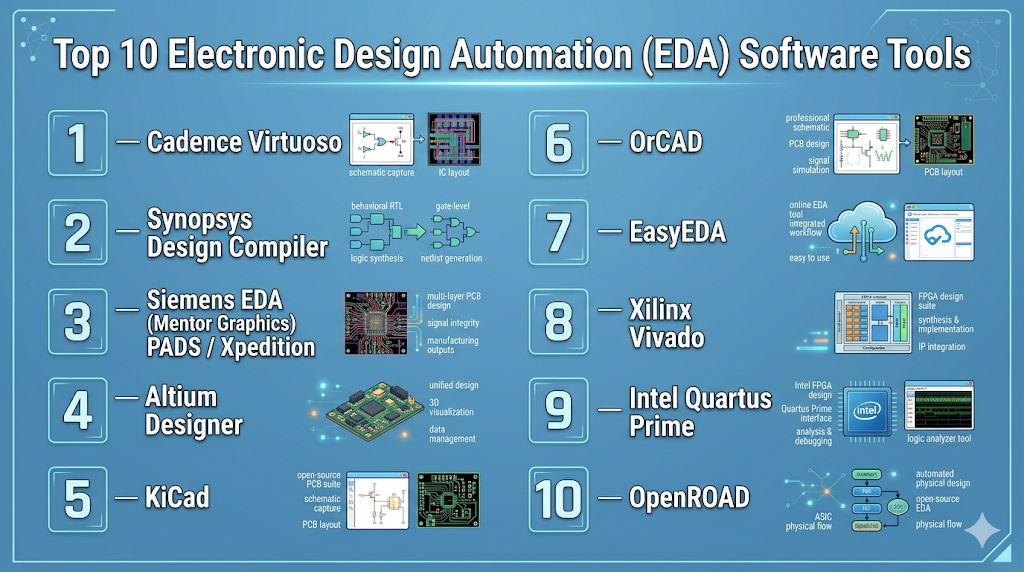
Top 10 Electronic Design Automation (EDA) Software Tools
#1 — Cadence Virtuoso
Short description: A leading platform for analog and mixed-signal IC design used by semiconductor companies.
Key Features
- Advanced analog and mixed-signal design
- Layout and schematic capture
- Simulation and verification tools
- Custom IC design workflows
- High-performance computing support
- Design rule checking (DRC)
Pros
- Industry-standard for IC design
- Highly accurate simulations
Cons
- Expensive
- Requires expertise
Platforms / Deployment
- Linux
- Self-hosted
Security & Compliance
- Not publicly stated
Integrations & Ecosystem
Strong semiconductor ecosystem integration.
- Foundry toolchains
- Verification tools
- APIs
Support & Community
Strong enterprise support and academic usage.
#2 — Synopsys Design Compiler
Short description: A widely used tool for logic synthesis in digital IC design workflows.
Key Features
- RTL-to-gate synthesis
- Timing optimization
- Power optimization
- Design constraints management
- Scalability for large designs
Pros
- High-quality synthesis results
- Industry adoption
Cons
- Complex setup
- High cost
Platforms / Deployment
- Linux
- Self-hosted
Security & Compliance
- Not publicly stated
Integrations & Ecosystem
Core part of semiconductor workflows.
- Verification tools
- Simulation tools
- APIs
Support & Community
Extensive enterprise support.
#3 — Siemens EDA (Mentor Graphics) PADS / Xpedition
Short description: A comprehensive PCB design suite for professional engineers.
Key Features
- PCB layout and routing
- Signal integrity analysis
- Design rule checking
- Collaboration tools
- Manufacturing output support
Pros
- Strong PCB capabilities
- Enterprise-grade reliability
Cons
- Expensive
- Learning curve
Platforms / Deployment
- Windows
- Self-hosted
Security & Compliance
- Not publicly stated
Integrations & Ecosystem
Works with engineering ecosystems.
- CAD tools
- Manufacturing tools
- APIs
Support & Community
Strong enterprise support.
#4 — Altium Designer
Short description: A popular PCB design tool known for usability and strong feature set.
Key Features
- PCB layout and routing
- Schematic capture
- 3D visualization
- Component libraries
- Design collaboration
Pros
- User-friendly
- Powerful PCB tools
Cons
- Expensive
- Resource-intensive
Platforms / Deployment
- Windows
- Cloud / Self-hosted
Security & Compliance
- Not publicly stated
Integrations & Ecosystem
Strong ecosystem for PCB workflows.
- Component libraries
- Cloud collaboration
- APIs
Support & Community
Large user base and documentation.
#5 — KiCad
Short description: A free and open-source EDA suite for PCB design and simulation.
Key Features
- Schematic capture
- PCB layout
- SPICE simulation
- 3D visualization
- BOM generation
Pros
- Free and open-source
- Active community
Cons
- Limited enterprise features
- UI inconsistencies
Platforms / Deployment
- Windows / macOS / Linux
- Self-hosted
Security & Compliance
- Not publicly stated
Integrations & Ecosystem
Extensible via plugins and tools.
- Community libraries
- APIs
- Simulation tools
Support & Community
Strong open-source community.
#6 — OrCAD
Short description: A PCB design solution widely used for mid-level electronic design workflows.
Key Features
- Schematic capture
- PCB layout
- Simulation tools
- Design rule checks
- Component libraries
Pros
- Reliable
- Good for mid-sized projects
Cons
- Limited advanced features
- Interface complexity
Platforms / Deployment
- Windows
- Self-hosted
Security & Compliance
- Not publicly stated
Integrations & Ecosystem
Part of Cadence ecosystem.
- Simulation tools
- CAD integration
- APIs
Support & Community
Strong documentation and support.
#7 — EasyEDA
Short description: A web-based EDA platform for schematic design and PCB layout.
Key Features
- Browser-based design
- Schematic capture
- PCB layout
- SPICE simulation
- Manufacturing integration
Pros
- Easy to access
- No installation required
Cons
- Limited advanced features
- Internet dependency
Platforms / Deployment
- Web
- Cloud
Security & Compliance
- Not publicly stated
Integrations & Ecosystem
Cloud-focused ecosystem.
- Component libraries
- Manufacturing services
- APIs
Support & Community
Growing community and tutorials.
#8 — Xilinx Vivado
Short description: A leading FPGA design suite for synthesis, implementation, and debugging.
Key Features
- FPGA synthesis and implementation
- Timing analysis
- Hardware debugging
- IP integration
- Simulation tools
Pros
- Strong FPGA support
- Integrated workflow
Cons
- Vendor lock-in
- Resource-heavy
Platforms / Deployment
- Windows / Linux
- Self-hosted
Security & Compliance
- Not publicly stated
Integrations & Ecosystem
Works within FPGA ecosystems.
- Hardware tools
- APIs
- IP libraries
Support & Community
Strong vendor support.
#9 — Intel Quartus Prime
Short description: FPGA development software for Intel-based hardware platforms.
Key Features
- FPGA design and synthesis
- Timing analysis
- Debugging tools
- IP core integration
- Simulation support
Pros
- Strong Intel FPGA support
- Reliable
Cons
- Vendor-specific
- Learning curve
Platforms / Deployment
- Windows / Linux
- Self-hosted
Security & Compliance
- Not publicly stated
Integrations & Ecosystem
Intel ecosystem integration.
- FPGA tools
- APIs
- IP libraries
Support & Community
Good vendor documentation.
#10 — OpenROAD
Short description: An open-source EDA tool for digital IC design and automation workflows.
Key Features
- Automated digital design flow
- Placement and routing
- Timing optimization
- Open-source flexibility
- Integration with other tools
Pros
- Free and evolving
- Supports modern workflows
Cons
- Less mature
- Requires expertise
Platforms / Deployment
- Linux
- Self-hosted
Security & Compliance
- Not publicly stated
Integrations & Ecosystem
Works with open-source toolchains.
- APIs
- Simulation tools
- Custom workflows
Support & Community
Active developer community.
Comparison Table (Top 10)
| Tool Name | Best For | Platform(s) Supported | Deployment | Standout Feature | Public Rating |
|---|---|---|---|---|---|
| Cadence Virtuoso | IC design | Linux | Self-hosted | Analog design | N/A |
| Synopsys Design Compiler | Synthesis | Linux | Self-hosted | RTL synthesis | N/A |
| Siemens EDA | PCB enterprise | Windows | Self-hosted | Signal integrity | N/A |
| Altium Designer | PCB design | Windows | Hybrid | Usability | N/A |
| KiCad | Open-source PCB | All major OS | Self-hosted | Free | N/A |
| OrCAD | Mid-level PCB | Windows | Self-hosted | Reliability | N/A |
| EasyEDA | Beginners | Web | Cloud | Browser-based | N/A |
| Vivado | FPGA | Windows, Linux | Self-hosted | FPGA workflow | N/A |
| Quartus Prime | FPGA Intel | Windows, Linux | Self-hosted | Intel ecosystem | N/A |
| OpenROAD | Open IC design | Linux | Self-hosted | Automation | N/A |
Evaluation & Scoring of Electronic Design Automation (EDA) Software
| Tool Name | Core (25%) | Ease (15%) | Integrations (15%) | Security (10%) | Performance (10%) | Support (10%) | Value (15%) | Weighted Total (0–10) |
|---|---|---|---|---|---|---|---|---|
| Cadence Virtuoso | 10 | 5 | 9 | 7 | 10 | 9 | 5 | 8.3 |
| Synopsys Compiler | 10 | 5 | 9 | 7 | 10 | 9 | 5 | 8.3 |
| Siemens EDA | 9 | 6 | 8 | 7 | 9 | 8 | 6 | 8.0 |
| Altium Designer | 8 | 8 | 8 | 6 | 8 | 8 | 7 | 7.8 |
| KiCad | 7 | 7 | 6 | 5 | 7 | 7 | 10 | 7.2 |
| OrCAD | 7 | 7 | 7 | 6 | 7 | 7 | 7 | 7.1 |
| EasyEDA | 6 | 9 | 6 | 5 | 6 | 6 | 9 | 6.9 |
| Vivado | 9 | 6 | 8 | 6 | 9 | 8 | 7 | 7.9 |
| Quartus | 8 | 6 | 7 | 6 | 8 | 7 | 7 | 7.4 |
| OpenROAD | 7 | 4 | 6 | 5 | 7 | 6 | 10 | 6.8 |
How to interpret scores:
- Enterprise tools dominate in performance and core capabilities
- Open-source tools provide excellent value but require expertise
- FPGA tools are strong in specialized workflows
- Ease of use varies significantly across tools
- Always match the tool to your specific design needs
Which Electronic Design Automation (EDA) Software Tool Is Right for You?
Solo / Freelancer
- Best options: EasyEDA, KiCad
- Focus on accessibility and cost
SMB
- Best options: Altium Designer, OrCAD
- Balanced performance and usability
Mid-Market
- Best options: Siemens EDA, Vivado
- Require scalability and integration
Enterprise
- Best options: Cadence Virtuoso, Synopsys
- Advanced chip design and verification
Budget vs Premium
- Budget: KiCad, OpenROAD
- Premium: Cadence, Synopsys
Feature Depth vs Ease of Use
- Easy: EasyEDA, Altium
- Advanced: Cadence, Synopsys
Integrations & Scalability
- Strong: Synopsys, Cadence
- Moderate: Altium
Security & Compliance Needs
- Enterprise tools offer stronger governance
- Cloud tools require evaluation of data handling
Frequently Asked Questions (FAQs)
What is EDA software used for?
EDA software is used to design, simulate, and verify electronic systems like PCBs and integrated circuits.
Is EDA software expensive?
Yes, enterprise tools can be very expensive, while open-source tools are free.
Can beginners use EDA tools?
Yes, tools like EasyEDA and KiCad are beginner-friendly.
What industries use EDA?
Semiconductors, automotive, aerospace, and electronics manufacturing.
What is FPGA design software?
It is used to design and program FPGA hardware systems.
Do I need programming knowledge?
Yes, especially for HDL-based workflows like Verilog or VHDL.
Is cloud EDA reliable?
It can be reliable depending on infrastructure and use case.
What is RTL design?
It is a method of describing digital circuits using hardware description languages.
Can open-source tools replace enterprise tools?
They can for smaller projects, but large-scale designs still rely on enterprise tools.
How long does it take to learn EDA?
Basic skills can be learned quickly, but advanced expertise takes significant time.
Conclusion
Electronic Design Automation software is essential for modern hardware development, enabling engineers to design complex electronic systems efficiently and accurately. From enterprise-grade platforms like Cadence and Synopsys to accessible tools like KiCad and EasyEDA, the ecosystem offers solutions for every level of complexity.