Introduction
Portfolio & Program Management (PPM) tools are platforms that help organizations manage multiple projects, programs, and resources under a unified strategy. Instead of focusing on individual tasks, PPM tools provide a high-level view of all initiatives, enabling leaders to prioritize investments, allocate resources efficiently, and align projects with business goals.
In today’s complex business environment, organizations often run dozens or even hundreds of projects simultaneously. PPM tools are critical for ensuring these projects contribute to strategic objectives, reduce risk, and optimize resource utilization.
Common use cases include:
- Strategic portfolio planning and prioritization
- Program-level coordination across multiple projects
- Resource capacity and allocation management
- Financial tracking and ROI analysis
- Enterprise PMO (Project Management Office) operations
What buyers should evaluate:
- Portfolio dashboards and reporting
- Resource and capacity planning
- Financial management and forecasting
- Scenario planning and prioritization
- Integration with ERP/CRM systems
- Workflow automation
- Security and access control
- Scalability across departments
- Ease of implementation
Best for: PMOs, enterprise leaders, program managers, and organizations managing multiple large-scale projects.
Not ideal for: Small teams or simple task tracking needs where lightweight project management tools are sufficient.
Key Trends in Portfolio & Program Management (PPM) Tools
- AI-driven portfolio optimization and risk prediction
- Scenario planning with “what-if” simulations
- Integration with enterprise systems like ERP and CRM
- Real-time dashboards for executive decision-making
- Hybrid project management (Agile + Waterfall + PPM)
- Increased focus on financial governance and ROI tracking
- Automation of resource allocation and workload balancing
- Cloud-first deployment with enterprise-grade security
- Data-driven decision-making using analytics and insights
- Cross-functional collaboration across departments
How We Selected These Tools (Methodology)
- Strong enterprise adoption and PMO usage
- Comprehensive portfolio and program management features
- Proven scalability for large organizations
- Advanced reporting and analytics capabilities
- Security features including access control and audit logs
- Integration ecosystem with enterprise tools
- Flexibility across industries and use cases
- Ease of use for program and portfolio managers
- Vendor innovation and product maturity
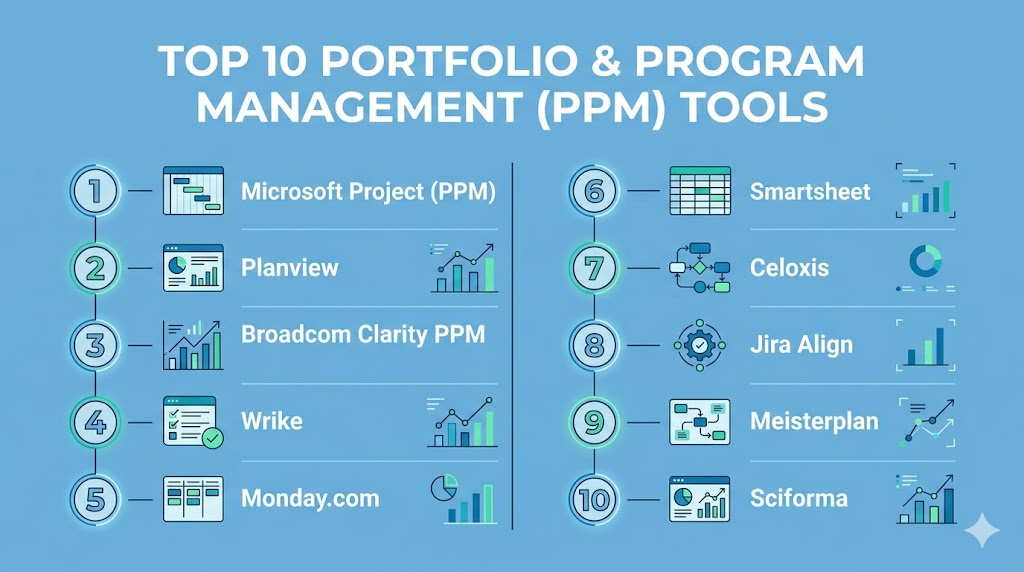
Top 10 Portfolio & Program Management (PPM) Tools
#1 — Microsoft Project (PPM)
Short description: A widely used enterprise solution for managing projects, portfolios, and resources at scale.
Key Features
- Portfolio dashboards
- Resource management
- Financial tracking
- Scenario planning
- Gantt charts
- Reporting tools
Pros
- Industry-standard solution
- Deep integration with enterprise tools
Cons
- Complex setup
- Expensive
Platforms / Deployment
Web / Windows / Cloud
Security & Compliance
SSO, MFA, RBAC, encryption
Integrations & Ecosystem
- Microsoft Teams
- SharePoint
- Power BI
Support & Community
Extensive enterprise support and documentation.
#2 — Planview
Short description: A strategic PPM platform designed for enterprise portfolio optimization.
Key Features
- Strategic planning
- Capacity planning
- Financial management
- Scenario modeling
- Portfolio dashboards
Pros
- Strong strategic alignment
- Advanced analytics
Cons
- High cost
- Requires training
Platforms / Deployment
Web / Cloud
Security & Compliance
Not publicly stated
Integrations & Ecosystem
- ERP systems
- CRM tools
Support & Community
Enterprise-level support.
#3 — Broadcom Clarity PPM
Short description: A comprehensive PPM platform for large enterprises managing complex portfolios.
Key Features
- Portfolio planning
- Resource management
- Financial tracking
- Risk management
- Reporting
Pros
- Highly scalable
- Strong governance features
Cons
- Complex interface
- Implementation effort
Platforms / Deployment
Web / Cloud / On-premise
Security & Compliance
SSO, MFA, RBAC
Integrations & Ecosystem
- Enterprise systems
- APIs
Support & Community
Strong enterprise support.
#4 — Wrike
Short description: A flexible PPM tool with strong collaboration and portfolio visibility features.
Key Features
- Portfolio dashboards
- Resource allocation
- Workflow automation
- Reporting
- Collaboration tools
Pros
- Easy to scale
- User-friendly
Cons
- Pricing can increase
- Advanced features require setup
Platforms / Deployment
Web / Mobile / Cloud
Security & Compliance
SSO, MFA, encryption
Integrations & Ecosystem
- Salesforce
- Slack
- Microsoft Teams
Support & Community
Strong support ecosystem.
#5 — Monday.com
Short description: A visual work platform with portfolio-level tracking and automation.
Key Features
- Portfolio dashboards
- Automation
- Resource tracking
- Custom workflows
- Reporting
Pros
- Visual interface
- Flexible customization
Cons
- Can get expensive
- Limited deep PPM features
Platforms / Deployment
Web / Mobile / Cloud
Security & Compliance
SSO, MFA, encryption
Integrations & Ecosystem
- Slack
- Zoom
- CRM tools
Support & Community
Good onboarding resources.
#6 — Smartsheet
Short description: A spreadsheet-style PPM tool with strong reporting and automation features.
Key Features
- Portfolio dashboards
- Automation workflows
- Resource management
- Reporting
- Gantt charts
Pros
- Familiar interface
- Flexible workflows
Cons
- Can become complex
- Learning curve
Platforms / Deployment
Web / Cloud
Security & Compliance
SSO, MFA, encryption
Integrations & Ecosystem
- Microsoft 365
- Google Workspace
Support & Community
Strong support and training.
#7 — Celoxis
Short description: A comprehensive PPM solution with strong planning and analytics capabilities.
Key Features
- Project scheduling
- Resource allocation
- Financial tracking
- Risk management
- Reporting
Pros
- Affordable for enterprises
- Strong analytics
Cons
- UI can feel dated
- Limited brand recognition
Platforms / Deployment
Web / Cloud / On-premise
Security & Compliance
Not publicly stated
Integrations & Ecosystem
- APIs
- Business tools
Support & Community
Moderate support.
#8 — Jira Align
Short description: A PPM tool focused on aligning Agile teams with enterprise strategy.
Key Features
- Portfolio alignment
- Agile program management
- Reporting dashboards
- Resource tracking
- Roadmapping
Pros
- Strong Agile alignment
- Enterprise scalability
Cons
- Complex setup
- Expensive
Platforms / Deployment
Web / Cloud
Security & Compliance
SSO, MFA
Integrations & Ecosystem
- Jira
- DevOps tools
Support & Community
Strong Atlassian ecosystem.
#9 — Meisterplan
Short description: A lightweight PPM tool focused on portfolio planning and resource management.
Key Features
- Resource planning
- Scenario simulation
- Portfolio dashboards
- Capacity planning
Pros
- Easy to use
- Strong planning features
Cons
- Limited execution features
- Smaller ecosystem
Platforms / Deployment
Web / Cloud
Security & Compliance
Not publicly stated
Integrations & Ecosystem
- Jira
- Smartsheet
Support & Community
Moderate support.
#10 — Sciforma
Short description: A robust PPM solution for portfolio planning and execution.
Key Features
- Portfolio management
- Resource planning
- Financial tracking
- Reporting
- Risk management
Pros
- Strong feature set
- Scalable
Cons
- Complex UI
- Implementation effort
Platforms / Deployment
Web / Cloud / On-premise
Security & Compliance
Not publicly stated
Integrations & Ecosystem
- APIs
- Enterprise systems
Support & Community
Enterprise support.
Comparison Table (Top 10)
| Tool Name | Best For | Platform(s) Supported | Deployment | Standout Feature | Public Rating |
|---|---|---|---|---|---|
| Microsoft Project | Enterprise PMOs | Web, Windows | Cloud | Portfolio dashboards | N/A |
| Planview | Strategic planning | Web | Cloud | Scenario modeling | N/A |
| Broadcom Clarity PPM | Large enterprises | Web | Hybrid | Governance features | N/A |
| Wrike | Scalable teams | Web, Mobile | Cloud | Collaboration | N/A |
| Monday.com | SMB teams | Web, Mobile | Cloud | Visual workflows | N/A |
| Smartsheet | Spreadsheet users | Web | Cloud | Spreadsheet-style PM | N/A |
| Celoxis | Budget enterprise | Web | Hybrid | Analytics | N/A |
| Jira Align | Agile enterprises | Web | Cloud | Agile alignment | N/A |
| Meisterplan | Resource planning | Web | Cloud | Scenario planning | N/A |
| Sciforma | Portfolio planning | Web | Hybrid | Resource management | N/A |
Evaluation & Scoring of Portfolio & Program Management (PPM) Tools
| Tool Name | Core | Ease | Integrations | Security | Performance | Support | Value | Weighted Total |
|---|---|---|---|---|---|---|---|---|
| Microsoft Project | 10 | 6 | 9 | 9 | 9 | 9 | 6 | 8.4 |
| Planview | 10 | 6 | 8 | 8 | 9 | 8 | 6 | 8.2 |
| Broadcom Clarity PPM | 10 | 5 | 8 | 9 | 9 | 8 | 6 | 8.1 |
| Wrike | 9 | 8 | 8 | 8 | 8 | 8 | 7 | 8.1 |
| Monday.com | 8 | 8 | 8 | 7 | 8 | 8 | 7 | 7.8 |
| Smartsheet | 9 | 8 | 8 | 8 | 8 | 8 | 7 | 8.0 |
| Celoxis | 9 | 7 | 7 | 7 | 8 | 7 | 8 | 7.9 |
| Jira Align | 9 | 6 | 9 | 8 | 8 | 8 | 6 | 8.0 |
| Meisterplan | 8 | 8 | 7 | 6 | 7 | 7 | 8 | 7.6 |
| Sciforma | 9 | 6 | 7 | 7 | 8 | 7 | 7 | 7.8 |
How to interpret:
These scores represent a comparative evaluation across tools. Higher scores indicate better balance across features, usability, and value. Enterprise tools typically score higher in capability but lower in ease of use.
Which Portfolio & Program Management Tool Is Right for You?
Solo / Freelancer
PPM tools are generally not required; lightweight project tools are better.
SMB
Monday.com and Smartsheet provide a simplified entry into portfolio management.
Mid-Market
Wrike, ClickUp-style platforms, and Celoxis offer balance between usability and capability.
Enterprise
Microsoft Project, Planview, and Broadcom Clarity PPM are ideal for complex portfolios.
Budget vs Premium
Meisterplan and Celoxis are more budget-friendly, while Planview and Clarity are premium.
Feature Depth vs Ease of Use
Monday.com = easier, Planview = deeper functionality.
Integrations & Scalability
Microsoft Project and Jira Align lead in integrations.
Security & Compliance Needs
Enterprise tools like Clarity and Microsoft Project are best suited.
Frequently Asked Questions (FAQs)
What is PPM software?
PPM software helps organizations manage multiple projects and align them with strategic goals.
Who uses PPM tools?
Primarily PMOs, enterprise leaders, and program managers.
What is the difference between project and portfolio management?
Project management focuses on individual projects, while PPM manages multiple projects together.
Are PPM tools only for large companies?
Mostly yes, but some tools offer SMB-friendly versions.
Do PPM tools support financial tracking?
Yes, many include budgeting and cost tracking features.
Can PPM tools integrate with ERP systems?
Yes, most enterprise tools support ERP and CRM integrations.
Are PPM tools complex to implement?
Enterprise tools can be complex and may require training.
Do they support Agile methodologies?
Many tools support hybrid Agile + Waterfall models.
What are common mistakes in PPM adoption?
Poor data quality, lack of governance, and unclear strategy alignment.
How do I choose the right PPM tool?
Focus on scalability, integration needs, and strategic alignment features.
Conclusion
Portfolio & Program Management tools play a critical role in helping organizations align strategy with execution and manage multiple initiatives effectively. These platforms go beyond task management by offering visibility into resources, budgets, and long-term business goals. While enterprise solutions like Microsoft Project, Planview, and Broadcom Clarity PPM provide deep capabilities, tools like Monday.com and Smartsheet offer more accessible entry points. The right choice depends on your organization’s complexity, budget, and integration needs. Instead of selecting a single tool blindly, shortlist a few options, run pilot projects, and validate how well they support your decision-making and portfolio strategy.