Clicking “buy” or “sell” on a brokerage platform seems simple until a trade fills at an unexpected price—or fails to fill at all. Behind every stock transaction sits an instruction telling your broker exactly how you want that trade handled. Choosing the wrong instruction can mean paying more than you intended during a sudden price spike, missing an entry opportunity by a few cents, or taking a larger loss than planned when a stock drops rapidly.
Three core order types handle the vast majority of retail and institutional stock trades: market orders, limit orders, and stop-loss orders. Each balances two competing priorities in different ways: speed of execution versus control over price. Understanding how these mechanics work in live markets helps you match your order type to your actual trading or investing goal.
The Core Trade-Off: Execution Speed vs. Price Control
Every stock listed on an exchange has two live prices visible in the order book at any given moment:
- The Bid Price: The highest price a buyer is currently willing to pay for a share.
- The Ask Price: The lowest price a seller is currently willing to accept for a share.
The gap between these two numbers is the bid-ask spread. For heavily traded large-cap stocks, that spread might be a single cent. For smaller, thinly traded companies, the gap can be much wider.
When you place an order, you are deciding how to interact with that spread. You can either accept the best available price on the board right now to guarantee your trade goes through, or specify your own price and wait for the market to come to you.
1. Market Orders: Prioritizing Immediate Execution
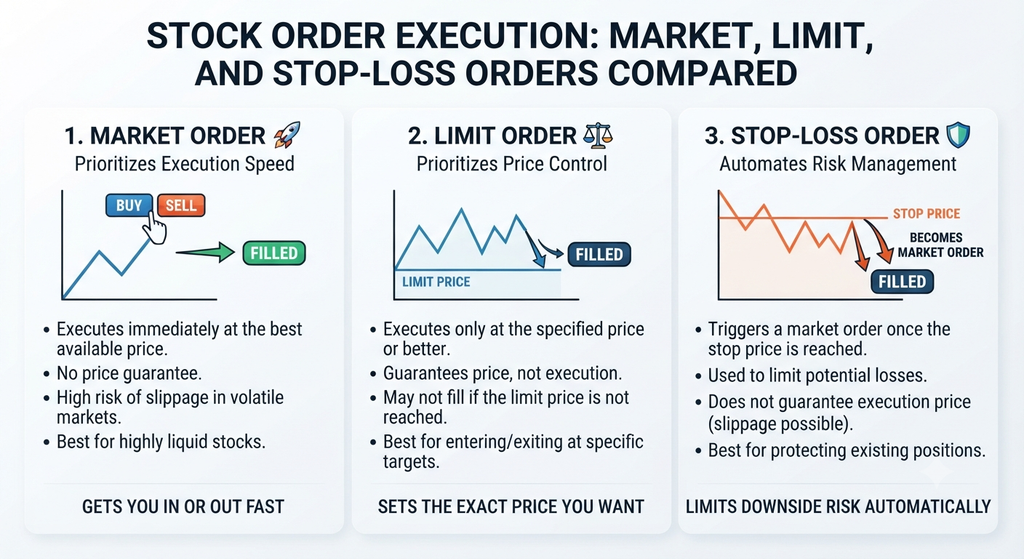
A market order is an instruction to buy or sell a stock immediately at the best available current price. When you submit a market order, your broker routes it to the exchange to be filled right away against existing orders in the order book.
How a Market Order Fills
Suppose a stock shows a bid of $49.98 and an ask of $50.00.
- If you place a market buy order, you are agreeing to pay the current ask price of $50.00 (or whatever the next available ask is if the shares at $50.00 are exhausted before your order arrives).
- If you place a market sell order, you are agreeing to sell at the current bid price of $49.98.
When Market Orders Make Sense
Market orders work best when getting into or out of a position matters more than saving a few pennies per share. Common scenarios include:
- Buying shares of a highly liquid, large-cap stock during regular market hours for a long-term portfolio.
- Exiting a position immediately when breaking news changes your investment thesis and you want out without delay.
The Main Risk: Slippage
Because a market order prioritizes speed over price, it carries no price guarantee. The price you see on your screen when you click submit is simply the last traded price or current quote—not a locked-in contract.
If a stock is moving quickly, or if your order size is larger than the number of shares available at the top of the order book, your order will fill at progressively worse prices. This difference between the expected price and the actual fill price is called slippage. Placing market orders right at the market open, right before the close, or on low-volume stocks increases the risk of severe slippage.
2. Limit Orders: Prioritizing Price Control
A limit order sets the maximum price you are willing to pay when buying, or the minimum price you are willing to accept when selling. Unlike a market order, a limit order will never execute at a price worse than the limit you specify.
Buy Limit vs. Sell Limit
- Buy Limit Order: Placed at or below the current market price. If a stock is trading at $50.00 and you only want to buy it if it dips to $48.50, you place a buy limit order at $48.50. The trade will only execute at $48.50 or lower.
- Sell Limit Order: Placed at or above the current market price. If you own shares trading at $50.00 and want to lock in profits if the stock reaches $55.00, you place a sell limit order at $55.00. The trade will only execute at $55.00 or higher.
When Limit Orders Make Sense
Limit orders give you strict control over your entry and exit prices. They are particularly helpful when:
- Trading stocks with wide bid-ask spreads or lower daily trading volume.
- Accumulating shares gradually at a predetermined valuation target.
- Setting automated profit targets so you do not have to watch price charts all day.
The Main Risk: Non-Execution
Price protection comes with a clear trade-off: a limit order is never guaranteed to fill. If a stock drops to $48.51 and bounces back up without ever touching your $48.50 buy limit, your order stays unfilled and you miss the move. Even if the stock briefly touches $48.50, other orders placed ahead of yours at that same price level may absorb all available shares before your order gets filled.
3. Stop-Loss Orders: Automating Downside Protection
A stop-loss order (often simply called a stop order) is designed primarily to limit losses on an existing position—or to protect unrealized gains after a stock has risen. It stays dormant in your broker’s system until the stock reaches a specific trigger price, known as the stop price.
How a Standard Stop-Loss Works
Imagine you buy a stock at $100.00 per share and decide you do not want to lose more than 8% on the trade. You place a sell stop-loss order with a stop price of $92.00.
- As long as the stock trades above $92.00, nothing happens.
- If the stock falls and trades at or below $92.00, the stop price is triggered.
- Once triggered, a standard stop-loss order immediately converts into a market order to sell your shares at the best available price.
Stop-Loss vs. Stop-Limit Orders
Because a standard stop-loss converts into a market order once triggered, it can suffer from slippage during a sharp market drop or an overnight price gap. If bad news causes a stock to close at $95.00 and open the next morning at $82.00, your $92.00 stop-loss will trigger at the open and execute near $82.00—well below your stop price.
To prevent selling at an unexpectedly low price during a flash drop, brokers also offer stop-limit orders. A stop-limit order uses two prices:
- Stop Price: The price that activates the order.
- Limit Price: The lowest price you are willing to accept once the order is activated.
For example, you might set a stop price at $92.00 and a limit price at $90.50. If the stock drops to $92.00, the order activates as a limit order to sell at $90.50 or better. However, if the stock gaps straight down to $82.00 and stays there, the limit condition prevents the sale—leaving you holding a falling stock.
Side-by-Side Comparison of Order Types
| Feature | Market Order | Limit Order | Stop-Loss Order |
| Primary Goal | Immediate execution | Exact price control | Automated loss limitation |
| Execution Guarantee | Yes (during market hours) | No | Yes, once stop price triggers |
| Price Guarantee | No | Yes (at limit or better) | No (becomes a market order) |
| Exposure to Slippage | High in volatile or thin markets | None (may receive price improvement) | Moderate to high during price gaps |
| Best Used For | Liquid stocks when speed is essential | Volatile/illiquid stocks, target entries/exits | Risk management on open positions |
Practical Details That Affect How Orders Behave
Choosing the order type is only half of the setup. Two additional settings on your order ticket control how long your instruction stays active and when it can execute.
Time-in-Force Instructions
- Day Order: The order remains active until the end of the regular trading session. If it does not fill by the market close, the broker cancels it automatically.
- Good-Til-Canceled (GTC): The order stays open across multiple trading days until it either executes or you manually cancel it (most brokers automatically expire GTC orders after 60 to 180 days).
Extended-Hours Trading Restrictions
During pre-market and after-hours sessions, trading volume drops sharply and bid-ask spreads widen. Because market orders and standard stop-loss orders can execute at extreme prices in thin extended-hours liquidity, most brokerages restrict extended-hours trading exclusively to limit orders. Furthermore, standard stop-loss orders typically only trigger during regular market hours unless you specifically select an extended-hours trigger option.
Frequently Asked Questions
Can a limit order fill at a better price than my limit?
Yes. Your limit price sets the worst price you are willing to accept. If you place a buy limit order at $50.00 and sellers suddenly offer shares at $49.85, your broker will fill your order at $49.85.
Why did my stop-loss order trigger even though the stock barely touched my price?
A stop-loss triggers when a qualifying trade occurs at or through your stop price on the exchange. Even if a single small trade prints at your stop price for a fraction of a second before bouncing higher, that print activates your market sell order.
Where should I place a stop-loss order?
Placing a stop-loss too close to the current price often leads to getting stopped out by normal daily price fluctuations. Many traders place stops below an established technical support level or base the distance on a stock’s average daily price range so normal noise does not trigger an early exit.
What is a trailing stop order?
A trailing stop is a dynamic variation of a stop-loss order. Instead of a fixed dollar price, you set the stop a specific dollar amount or percentage below the current market price. If the stock rises, the stop price moves upward automatically by that same distance; if the stock falls, the stop price stays locked in place.
Matching Your Order to Your Intent
Before submitting any trade, decide which mistake would hurt your strategy more: missing the trade or getting a bad fill price. When liquidity is deep and immediate action matters, a market order gets the job done cleanly. When price discipline is the priority—especially around earnings, market opens, or thinly traded stocks—a limit order keeps your costs predictable. Finally, pairing open positions with a well-placed stop-loss ensures that a routine losing trade never turns into a portfolio-damaging loss.