Introduction
Image editing software enables users to create, modify, enhance, and manipulate digital images for a wide range of purposes—from simple photo adjustments to complex graphic design and professional visual production. These tools are essential across industries such as marketing, media, e-commerce, gaming, and content creation.
As visual content becomes central to digital communication, image editing tools have evolved significantly. Modern platforms now include AI-powered editing, generative design features, cloud collaboration, and real-time rendering. Whether you’re retouching photos, designing social media assets, or creating digital art, the right tool can dramatically improve productivity and output quality.
Common use cases include:
- Photo editing and retouching
- Graphic design and marketing creatives
- Digital painting and illustration
- Social media content creation
- Product image optimization for e-commerce
Key evaluation criteria buyers should consider:
- Editing capabilities (layers, masks, filters)
- AI tools (auto-enhance, generative fill, background removal)
- Ease of use vs advanced control
- File format support and export quality
- Performance and system requirements
- Cross-platform compatibility
- Collaboration and cloud features
- Integration with creative tools
- Pricing model and licensing
Best for: Designers, photographers, marketers, content creators, and digital artists.
Not ideal for: Users who only need basic cropping or resizing—simple mobile apps or built-in tools may be sufficient.
Key Trends in Image Editing Software
- AI-powered editing: Auto-enhancements, object removal, and generative design
- Cloud-based collaboration: Real-time editing and asset sharing
- Non-destructive workflows: Advanced layer-based editing systems
- Cross-device editing: Seamless desktop and mobile workflows
- Template-driven design: Pre-built layouts for faster creation
- 3D and AR integration: Expanding into immersive content creation
- Automation tools: Batch editing and presets
- Browser-based editors: No installation required
- Integration with design ecosystems: Creative suites and asset libraries
- Focus on performance optimization: GPU acceleration and faster rendering
How We Selected These Tools (Methodology)
- Evaluated market adoption across designers and photographers
- Assessed editing capabilities and feature depth
- Reviewed AI and automation features
- Considered ease of use for beginners vs professionals
- Included tools for both raster and vector workflows
- Analyzed performance and system efficiency
- Evaluated integration with creative ecosystems
- Reviewed community support and learning resources
- Balanced free, open-source, and premium solutions
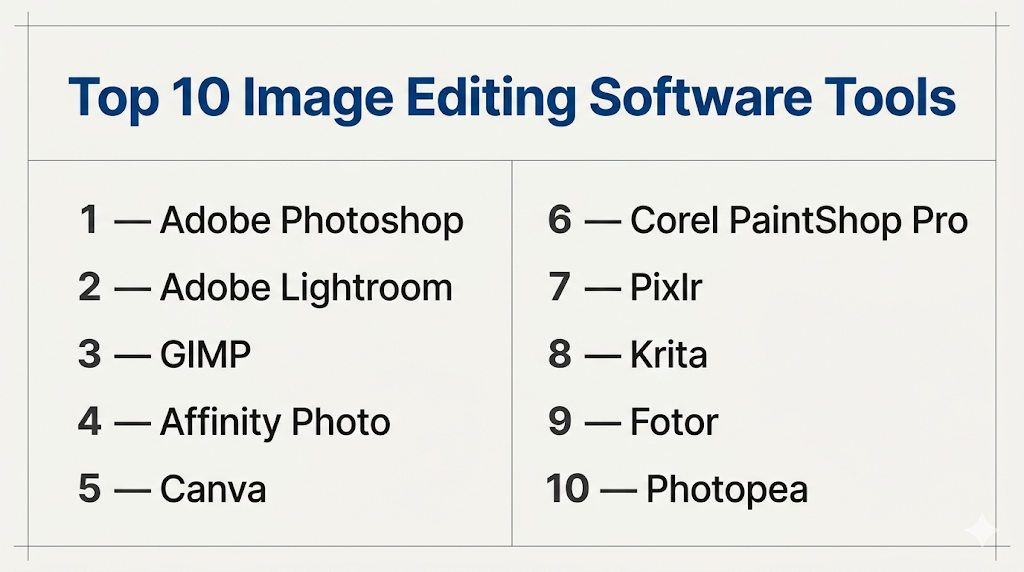
Top 10 Image Editing Software Tools
#1 — Adobe Photoshop
Short description: Industry-standard image editing software used for professional photo editing, design, and digital art.
Key Features
- Advanced layer-based editing
- AI tools like generative fill and object selection
- Extensive filters and effects
- RAW image processing
- Plugin ecosystem
- Non-destructive editing
Pros
- Extremely powerful and versatile
- Industry standard
Cons
- Expensive subscription
- Steep learning curve
Platforms / Deployment
Windows / macOS
Local / Cloud
Security & Compliance
Not publicly stated
Integrations & Ecosystem
Part of a large creative ecosystem.
- Creative suite tools
- Plugins and extensions
- Asset libraries
Support & Community
Massive global community with extensive tutorials.
#2 — Adobe Lightroom
Short description: A photo-focused editing tool optimized for batch processing and workflow efficiency.
Key Features
- Non-destructive editing
- Presets and batch processing
- Cloud syncing
- AI-based adjustments
- RAW editing
- Organization tools
Pros
- Excellent for photographers
- Fast workflow
Cons
- Limited design tools
- Subscription model
Platforms / Deployment
Windows / macOS / Mobile
Cloud / Local
Security & Compliance
Not publicly stated
Integrations & Ecosystem
Integrated with creative tools.
- Cloud storage
- Photo libraries
Support & Community
Strong photography community.
#3 — GIMP
Short description: A free, open-source image editor offering advanced editing capabilities similar to premium tools.
Key Features
- Layer-based editing
- Custom plugins
- Advanced filters
- Scriptable workflows
- Open-source flexibility
- Cross-platform support
Pros
- Free and powerful
- Highly customizable
Cons
- Outdated interface
- Learning curve
Platforms / Deployment
Windows / macOS / Linux
Local
Security & Compliance
Not publicly stated
Integrations & Ecosystem
Open-source ecosystem.
- Plugins
- Scripts
Support & Community
Active open-source community.
#4 — Affinity Photo
Short description: A professional-grade image editor offering powerful features without subscription pricing.
Key Features
- High-performance editing
- RAW processing
- Layer-based workflow
- Advanced retouching tools
- HDR and panorama support
- Non-destructive editing
Pros
- One-time purchase
- High performance
Cons
- Smaller ecosystem
- Limited cloud features
Platforms / Deployment
Windows / macOS / iPad
Local
Security & Compliance
Not publicly stated
Integrations & Ecosystem
Standalone ecosystem.
- File export tools
- Asset management
Support & Community
Growing user base.
#5 — Canva
Short description: A user-friendly design platform focused on quick visual content creation with templates.
Key Features
- Drag-and-drop editor
- Thousands of templates
- AI design tools
- Stock asset library
- Collaboration features
- Cloud-based editing
Pros
- Extremely easy to use
- Great for non-designers
Cons
- Limited advanced editing
- Template dependency
Platforms / Deployment
Web / Mobile
Cloud
Security & Compliance
Not publicly stated
Integrations & Ecosystem
Strong integration ecosystem.
- Social media platforms
- Cloud storage
Support & Community
Massive global user base.
#6 — Corel PaintShop Pro
Short description: A feature-rich image editor offering a balance between usability and advanced tools.
Key Features
- Layer-based editing
- AI tools
- RAW editing
- Batch processing
- Graphic design tools
Pros
- Affordable
- Feature-rich
Cons
- Windows-only
- Smaller community
Platforms / Deployment
Windows
Local
Security & Compliance
Not publicly stated
Integrations & Ecosystem
Basic integrations.
- Plugins
- Export tools
Support & Community
Moderate community.
#7 — Pixlr
Short description: A browser-based image editor offering quick editing and AI-powered tools.
Key Features
- Online editing
- AI background removal
- Filters and effects
- Templates
- Lightweight interface
Pros
- No installation required
- Easy to use
Cons
- Limited advanced features
- Internet dependency
Platforms / Deployment
Web
Cloud
Security & Compliance
Not publicly stated
Integrations & Ecosystem
Cloud-based workflows.
- Browser tools
- Export options
Support & Community
Moderate support.
#8 — Krita
Short description: A free, open-source painting and illustration tool for digital artists.
Key Features
- Brush engine
- Layer-based editing
- Animation support
- Customizable interface
- Tablet support
Pros
- Excellent for digital art
- Free
Cons
- Not ideal for photo editing
- Learning curve
Platforms / Deployment
Windows / macOS / Linux
Local
Security & Compliance
Not publicly stated
Integrations & Ecosystem
Artist-focused ecosystem.
- Brushes
- Plugins
Support & Community
Strong artist community.
#9 — Fotor
Short description: A simple online image editor with AI tools and templates.
Key Features
- AI photo enhancement
- Filters and effects
- Templates
- Batch editing
- Cloud storage
Pros
- Easy to use
- Good for quick edits
Cons
- Limited advanced tools
- Ads in free version
Platforms / Deployment
Web / Mobile
Cloud
Security & Compliance
Not publicly stated
Integrations & Ecosystem
Basic integrations.
- Cloud tools
- Export options
Support & Community
Moderate support.
#10 — Photopea
Short description: A browser-based image editor with a Photoshop-like interface.
Key Features
- Layer-based editing
- PSD file support
- Browser-based
- Advanced tools
- No installation
Pros
- Free and accessible
- Familiar interface
Cons
- Ads in free version
- Internet dependency
Platforms / Deployment
Web
Cloud
Security & Compliance
Not publicly stated
Integrations & Ecosystem
Supports design workflows.
- File compatibility
- Export tools
Support & Community
Growing user base.
Comparison Table (Top 10)
| Tool Name | Best For | Platform(s) Supported | Deployment | Standout Feature | Public Rating |
|---|---|---|---|---|---|
| Adobe Photoshop | Professionals | Win/macOS | Hybrid | Advanced editing | N/A |
| Adobe Lightroom | Photographers | Multi-platform | Hybrid | Batch editing | N/A |
| GIMP | Free users | Multi-platform | Local | Open-source | N/A |
| Affinity Photo | Professionals | Multi-platform | Local | One-time purchase | N/A |
| Canva | Beginners | Web/Mobile | Cloud | Templates | N/A |
| PaintShop Pro | Windows users | Windows | Local | Affordable | N/A |
| Pixlr | Quick edits | Web | Cloud | AI tools | N/A |
| Krita | Artists | Multi-platform | Local | Digital painting | N/A |
| Fotor | Casual users | Web/Mobile | Cloud | AI enhancement | N/A |
| Photopea | Browser users | Web | Cloud | PSD support | N/A |
Evaluation & Scoring of Image Editing Software
| Tool Name | Core (25%) | Ease (15%) | Integrations (15%) | Security (10%) | Performance (10%) | Support (10%) | Value (15%) | Weighted Total |
|---|---|---|---|---|---|---|---|---|
| Adobe Photoshop | 10 | 6 | 10 | 5 | 9 | 10 | 7 | 8.8 |
| Lightroom | 9 | 8 | 8 | 5 | 9 | 9 | 7 | 8.3 |
| GIMP | 8 | 6 | 7 | 5 | 8 | 8 | 10 | 8.0 |
| Affinity Photo | 9 | 7 | 7 | 5 | 9 | 7 | 9 | 8.1 |
| Canva | 7 | 10 | 8 | 5 | 7 | 9 | 9 | 8.1 |
| PaintShop Pro | 8 | 7 | 6 | 5 | 8 | 7 | 8 | 7.6 |
| Pixlr | 7 | 9 | 6 | 5 | 7 | 7 | 8 | 7.4 |
| Krita | 8 | 7 | 6 | 5 | 8 | 8 | 10 | 7.9 |
| Fotor | 6 | 10 | 6 | 5 | 7 | 6 | 8 | 7.2 |
| Photopea | 8 | 8 | 7 | 5 | 7 | 7 | 9 | 7.8 |
How to interpret the scores:
- Higher scores indicate better overall balance
- Professionals should prioritize core features and integrations
- Beginners should focus on ease of use
- Free tools often score high in value
- Choose based on your workflow and creative needs
Which Image Editing Software Tool Is Right for You?
Solo / Freelancer
- Best options: Canva, Photopea, GIMP
- Focus on cost and ease
SMB
- Best options: Canva, Affinity Photo
- Balance features and usability
Mid-Market
- Best options: Photoshop, Lightroom
- Need advanced workflows
Enterprise
- Best options: Photoshop
- Require scalability and ecosystem
Budget vs Premium
- Budget: GIMP, Photopea
- Premium: Photoshop, Affinity
Feature Depth vs Ease of Use
- Advanced: Photoshop, GIMP
- Easy: Canva, Fotor
Integrations & Scalability
- Strong: Adobe ecosystem
- Limited: standalone tools
Security & Compliance Needs
- Most tools: Not publicly stated
- Enterprises should validate internally
Frequently Asked Questions (FAQs)
What is image editing software?
Software used to modify and enhance digital images.
Which tool is best for beginners?
Canva and Fotor are beginner-friendly.
Is Photoshop worth it?
Yes, for professionals needing advanced features.
Are free tools good enough?
Yes, tools like GIMP offer strong capabilities.
What is non-destructive editing?
Editing without permanently altering the original image.
Can I edit RAW images?
Yes, many tools support RAW formats.
Are browser-based tools reliable?
Yes, for basic to intermediate editing.
Which tool is best for digital art?
Krita is a strong option.
Do I need a powerful computer?
For advanced tools like Photoshop, yes.
Can I collaborate with others?
Yes, cloud tools like Canva support collaboration.
Conclusion
Image editing software plays a critical role in modern content creation and digital workflows. From beginner-friendly tools to professional-grade platforms, there is a solution for every use case.