Introduction
Integrated Development Environments (IDEs) are comprehensive software tools that provide developers with everything needed to write, test, debug, and deploy code in one place. Unlike lightweight code editors, IDEs bundle essential components such as code editors, compilers, debuggers, build automation tools, and intelligent assistance into a single unified platform.
In today’s fast-evolving development ecosystem, IDEs have become critical for accelerating productivity, reducing errors, and managing complex applications. With the rise of cloud-native development, AI-assisted coding, and DevOps practices, modern IDEs are no longer just development tools—they are full development platforms that integrate seamlessly with version control, CI/CD pipelines, and cloud services.
Real-World Use Cases
- Building enterprise-grade applications across multiple languages
- Debugging and testing large-scale systems
- Developing mobile, web, and desktop applications
- Managing microservices and cloud-native architectures
- Collaborating within development teams
What Buyers Should Evaluate
- Language and framework support
- Debugging and testing capabilities
- Performance and scalability
- Built-in vs plugin-based features
- AI-assisted development features
- Integration with DevOps tools
- Cross-platform support
- Ease of use and onboarding
- Licensing and cost
Best for: Professional developers, enterprise teams, and organizations building complex applications requiring advanced tooling and debugging capabilities.
Not ideal for: Beginners or users working on simple scripts or lightweight projects where a basic code editor is sufficient.
Key Trends in Integrated Development Environments (IDEs) for 2026 and Beyond
- AI-powered coding assistants and copilots becoming standard
- Deep integration with cloud and container-based development
- Remote development environments and browser-based IDEs
- Built-in DevSecOps and security scanning tools
- Increased support for microservices and distributed systems
- Cross-language development capabilities
- Enhanced debugging with real-time analytics
- Low-code and no-code integrations emerging
- Performance optimization for large-scale projects
- Improved collaboration and pair programming features
How We Selected These Tools (Methodology)
- High adoption among developers and enterprises
- Strong language and framework support
- Advanced debugging and testing capabilities
- Performance and reliability in large projects
- Integration with modern development workflows
- Active development and product updates
- Strong community and enterprise support
- Flexibility across different platforms and use cases
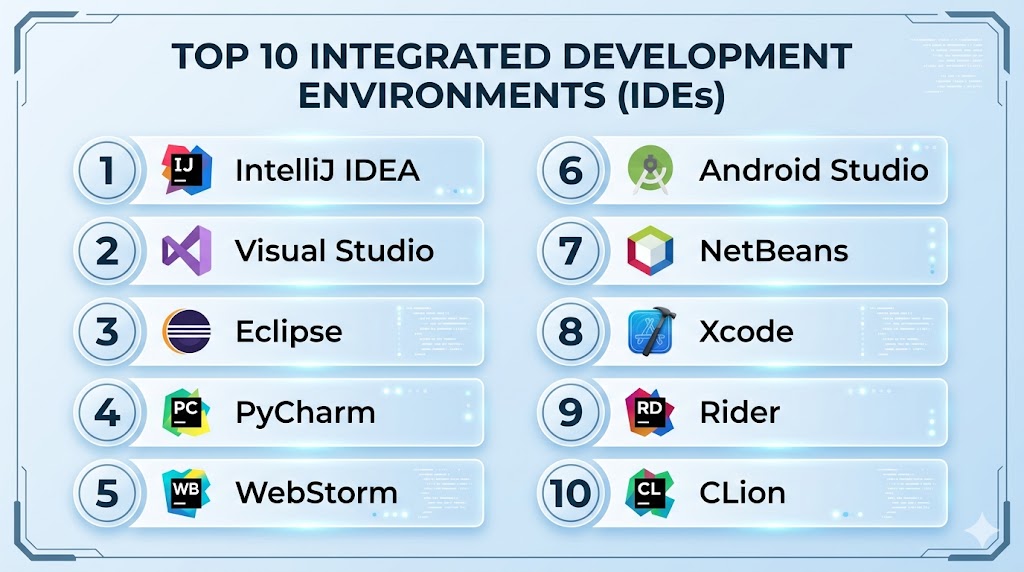
Top 10 Integrated Development Environments (IDEs)
#1 — IntelliJ IDEA
Short description: A powerful Java-focused IDE with advanced features for enterprise and professional development.
Key Features
- Smart code completion and analysis
- Advanced debugging tools
- Refactoring capabilities
- Built-in version control
- Framework and language support
Pros
- Excellent for Java development
- Rich feature set
Cons
- Resource-intensive
- Paid version for full features
Platforms / Deployment
Windows / macOS / Linux
Desktop
Security & Compliance
Not publicly stated
Integrations & Ecosystem
- Git
- Maven
- Gradle
- Docker
Support & Community
Strong enterprise support and active community.
#2 — Visual Studio
Short description: A comprehensive IDE by Microsoft designed for Windows, .NET, and enterprise development.
Key Features
- Advanced debugging and diagnostics
- Integrated testing tools
- .NET and C++ support
- Azure integration
- Code profiling
Pros
- Strong Microsoft ecosystem integration
- Enterprise-ready
Cons
- Heavy resource usage
- Best on Windows
Platforms / Deployment
Windows / macOS
Desktop
Security & Compliance
Not publicly stated
Integrations & Ecosystem
- Azure
- GitHub
- Docker
Support & Community
Extensive documentation and enterprise support.
#3 — Eclipse
Short description: A long-standing open-source IDE widely used for Java and enterprise development.
Key Features
- Plugin-based architecture
- Java development tools
- Debugging support
- Code analysis
- Cross-platform support
Pros
- Highly extensible
- Free and open-source
Cons
- Complex setup
- UI feels outdated
Platforms / Deployment
Windows / macOS / Linux
Desktop
Security & Compliance
Not publicly stated
Integrations & Ecosystem
- Git
- Maven
- Jenkins
Support & Community
Large global community.
#4 — PyCharm
Short description: A Python-focused IDE with advanced tools for data science and web development.
Key Features
- Intelligent code completion
- Debugging and testing tools
- Django and Flask support
- Database tools
- Scientific tools integration
Pros
- Best-in-class Python support
- Rich features
Cons
- Paid version for full features
- Resource-heavy
Platforms / Deployment
Windows / macOS / Linux
Desktop
Security & Compliance
Not publicly stated
Integrations & Ecosystem
- Git
- Docker
- Kubernetes
Support & Community
Strong developer community.
#5 — WebStorm
Short description: A JavaScript-focused IDE for frontend and full-stack web development.
Key Features
- JavaScript and TypeScript support
- Debugging tools
- Framework integration
- Code refactoring
- Built-in testing tools
Pros
- Excellent for web development
- Strong framework support
Cons
- Paid tool
- Resource usage
Platforms / Deployment
Windows / macOS / Linux
Desktop
Security & Compliance
Not publicly stated
Integrations & Ecosystem
- Git
- Node.js
- Docker
Support & Community
Active developer community.
#6 — Android Studio
Short description: Official IDE for Android development with deep integration into Android SDK.
Key Features
- Android SDK integration
- UI design tools
- Emulator support
- Debugging tools
- Performance profiling
Pros
- Best for Android apps
- Official support
Cons
- Resource-intensive
- Limited outside Android
Platforms / Deployment
Windows / macOS / Linux
Desktop
Security & Compliance
Not publicly stated
Integrations & Ecosystem
- Firebase
- Google Cloud
- Gradle
Support & Community
Strong community and official support.
#7 — NetBeans
Short description: Open-source IDE supporting multiple languages including Java and PHP.
Key Features
- Multi-language support
- Built-in debugging
- GUI builder
- Project management tools
- Plugin support
Pros
- Free and open-source
- Easy to use
Cons
- Slower performance
- Smaller ecosystem
Platforms / Deployment
Windows / macOS / Linux
Desktop
Security & Compliance
Not publicly stated
Integrations & Ecosystem
- Git
- Maven
Support & Community
Active but smaller community.
#8 — Xcode
Short description: Apple’s official IDE for macOS and iOS development.
Key Features
- Swift and Objective-C support
- Interface Builder
- Simulator tools
- Debugging tools
- Performance profiling
Pros
- Best for Apple ecosystem
- Official support
Cons
- macOS-only
- Limited cross-platform support
Platforms / Deployment
macOS
Desktop
Security & Compliance
Not publicly stated
Integrations & Ecosystem
- Apple SDKs
- Git
Support & Community
Strong Apple developer community.
#9 — Rider
Short description: A .NET-focused IDE by JetBrains with cross-platform support.
Key Features
- .NET and C# support
- Debugging tools
- Code analysis
- Refactoring tools
- Cross-platform support
Pros
- Cross-platform .NET development
- Strong performance
Cons
- Paid tool
- Smaller adoption compared to Visual Studio
Platforms / Deployment
Windows / macOS / Linux
Desktop
Security & Compliance
Not publicly stated
Integrations & Ecosystem
- Git
- Docker
Support & Community
Growing community.
#10 — CLion
Short description: A C/C++ IDE by JetBrains designed for systems and embedded development.
Key Features
- C/C++ support
- Debugging tools
- Code analysis
- CMake integration
- Refactoring
Pros
- Excellent for C/C++
- Strong debugging
Cons
- Paid tool
- Resource usage
Platforms / Deployment
Windows / macOS / Linux
Desktop
Security & Compliance
Not publicly stated
Integrations & Ecosystem
- Git
- CMake
Support & Community
Active developer community.
Comparison Table (Top 10)
| Tool Name | Best For | Platform(s) Supported | Deployment | Standout Feature | Public Rating |
|---|---|---|---|---|---|
| IntelliJ IDEA | Java dev | Multi-OS | Desktop | Smart coding | N/A |
| Visual Studio | Enterprise | Windows/macOS | Desktop | .NET integration | N/A |
| Eclipse | Open-source | Multi-OS | Desktop | Plugins | N/A |
| PyCharm | Python dev | Multi-OS | Desktop | Python tools | N/A |
| WebStorm | Web dev | Multi-OS | Desktop | JS support | N/A |
| Android Studio | Mobile dev | Multi-OS | Desktop | Android tools | N/A |
| NetBeans | Multi-language | Multi-OS | Desktop | Simplicity | N/A |
| Xcode | Apple dev | macOS | Desktop | Apple tools | N/A |
| Rider | .NET dev | Multi-OS | Desktop | Cross-platform | N/A |
| CLion | C/C++ dev | Multi-OS | Desktop | Debugging | N/A |
Evaluation & Scoring of Integrated Development Environments (IDEs)
| Tool Name | Core | Ease | Integrations | Security | Performance | Support | Value | Weighted Total |
|---|---|---|---|---|---|---|---|---|
| IntelliJ | 10 | 8 | 9 | 8 | 9 | 9 | 8 | 9.0 |
| Visual Studio | 10 | 8 | 9 | 8 | 9 | 9 | 8 | 9.0 |
| Eclipse | 8 | 6 | 8 | 7 | 7 | 8 | 9 | 7.8 |
| PyCharm | 9 | 8 | 8 | 7 | 8 | 8 | 7 | 8.3 |
| WebStorm | 9 | 8 | 8 | 7 | 8 | 8 | 7 | 8.3 |
| Android Studio | 9 | 7 | 8 | 7 | 8 | 8 | 8 | 8.2 |
| NetBeans | 8 | 7 | 7 | 7 | 7 | 7 | 9 | 7.8 |
| Xcode | 9 | 7 | 7 | 7 | 8 | 8 | 8 | 8.1 |
| Rider | 9 | 8 | 8 | 7 | 8 | 8 | 7 | 8.3 |
| CLion | 9 | 7 | 7 | 7 | 8 | 8 | 7 | 8.0 |
How to interpret scores:
These scores are comparative and reflect how each IDE performs across key evaluation criteria. Higher scores indicate a better balance of features, usability, and performance. However, specialized IDEs may score differently depending on use cases—for example, Android Studio excels in mobile development but may not suit general-purpose needs. Always choose based on your project requirements.
Which Integrated Development Environments (IDEs) Tool Is Right for You?
Solo / Freelancer
VS Code alternative may work, but IntelliJ Community or NetBeans are great IDE options.
SMB
PyCharm and WebStorm offer strong productivity features.
Mid-Market
IntelliJ and Visual Studio provide scalability and integrations.
Enterprise
Visual Studio and IntelliJ IDEA Ultimate are top choices.
Budget vs Premium
- Budget: Eclipse, NetBeans
- Premium: IntelliJ Ultimate, Rider
Feature Depth vs Ease of Use
- Feature-rich: IntelliJ, Visual Studio
- Easy-to-use: NetBeans
Integrations & Scalability
- Best integrations: Visual Studio
- Scalable: IntelliJ
Security & Compliance Needs
- Enterprise-ready: Visual Studio
- Moderate: Eclipse
Frequently Asked Questions (FAQs)
What is an IDE?
An IDE is a software suite that combines tools for coding, debugging, and testing in one application.
How is an IDE different from a code editor?
IDEs include more features like compilers and debuggers, while editors are lightweight.
Are IDEs free?
Some are free (Eclipse, NetBeans), while others offer paid versions.
Which IDE is best for beginners?
NetBeans and IntelliJ Community are good starting points.
Do IDEs support multiple languages?
Many IDEs support multiple languages through plugins.
Can IDEs handle large projects?
Yes, especially enterprise-grade IDEs.
Are IDEs resource-heavy?
Most are heavier than code editors.
Do IDEs support AI coding?
Many modern IDEs include AI-assisted features.
Can I use multiple IDEs?
Yes, depending on your project needs.
What is the best IDE overall?
It depends on your language and workflow requirements.
Conclusion
Integrated Development Environments are powerful tools that streamline the entire software development lifecycle. From IntelliJ’s smart coding features to Visual Studio’s enterprise capabilities, each IDE offers unique strengths tailored to specific development needs. As development becomes more complex and integrated with cloud and AI technologies, choosing the right IDE is more important than ever. The best approach is to identify your primary use case, shortlist a few IDEs, and test them in real-world scenarios. A well-chosen IDE can significantly enhance productivity, improve code quality, and accelerate development timelines across your projects.