Introduction
Wi-Fi Planning Tools are specialized software solutions that help design, simulate, and optimize wireless networks before they are deployed. These tools analyze signal strength, interference, access point placement, and environmental obstacles to ensure strong and reliable connectivity across spaces like offices, campuses, warehouses, and public venues.
As wireless connectivity becomes the backbone of modern operations, poor Wi-Fi design can lead to performance issues, downtime, and user frustration. With the rise of high-density environments, IoT devices, and hybrid work models, planning tools have evolved to include automation, predictive modeling, and intelligent optimization to deliver better outcomes faster.
Real-world use cases include:
- Designing enterprise office Wi-Fi networks
- Planning coverage for warehouses, hospitals, and factories
- Optimizing campus or multi-building connectivity
- Simulating network performance before deployment
- Troubleshooting and improving existing wireless networks
What buyers should evaluate:
- RF simulation accuracy
- Heatmapping and visualization capabilities
- Support for modern Wi-Fi standards
- Integration with network hardware vendors
- Automation and intelligent planning features
- Ease of use and learning curve
- Reporting and documentation features
- Scalability for large environments
- Cost versus value
Best for: IT managers, network engineers, MSPs, system integrators, and enterprises managing large or complex wireless environments.
Not ideal for: Small setups using basic routers where advanced planning is unnecessary.
Key Trends in Wi-Fi Planning Tools
- AI-assisted access point placement and optimization
- Cloud-based planning platforms for remote collaboration
- Advanced support for high-density and IoT environments
- Digital twin simulations for real-world modeling
- Integration with monitoring and analytics tools
- Automation in site surveys using mobile apps
- Security-focused network design workflows
- Subscription-based pricing models
- Vendor-neutral interoperability
- Real-time performance validation features
How We Selected These Tools (Methodology)
- Considered market adoption and industry credibility
- Evaluated feature completeness and innovation
- Assessed performance and reliability indicators
- Reviewed security posture and available safeguards
- Analyzed integration capabilities and ecosystem strength
- Included tools suitable for enterprise and SMB use cases
- Compared ease of use vs advanced capabilities
- Looked at deployment flexibility (cloud and on-premises)
- Focused on real-world usability and scalability
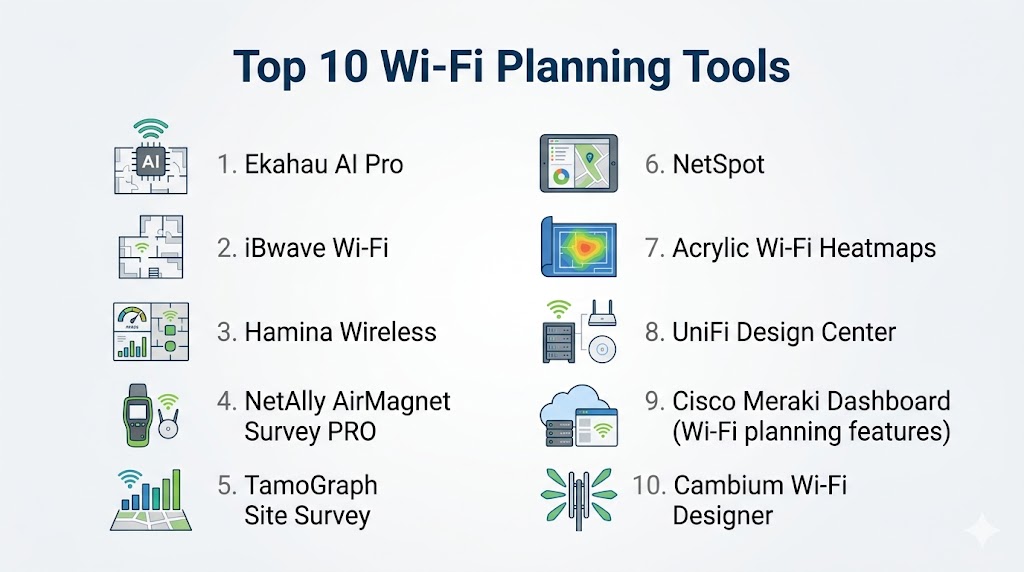
Top 10 Wi-Fi Planning Tools
#1 — Ekahau AI Pro
Short description: A leading Wi-Fi design and survey platform used by professionals for highly accurate RF planning and analysis across complex environments.
Key Features
- Predictive Wi-Fi modeling
- Advanced heatmaps and visualization
- Real-time site survey tools
- AI-assisted access point placement
- Spectrum analysis capabilities
- Multi-floor and high-density planning
Pros
- Industry-leading accuracy
- Trusted by enterprise professionals
Cons
- High cost
- Requires training for advanced usage
Platforms / Deployment
Windows / macOS
Self-hosted
Security & Compliance
Not publicly stated
Integrations & Ecosystem
Ekahau integrates with major enterprise networking ecosystems and hardware vendors.
- Cisco
- Aruba
- Juniper
- API support
Support & Community
Strong documentation, certification programs, and active professional community.
#2 — NetSpot
Short description: A user-friendly Wi-Fi planning and analysis tool suitable for small to mid-sized environments and beginners.
Key Features
- Heatmap visualization
- Signal strength analysis
- Predictive planning mode
- Wi-Fi troubleshooting tools
- Easy-to-use interface
- Multi-device support
Pros
- Simple and intuitive
- Cost-effective
Cons
- Limited advanced enterprise features
- Less detailed analytics
Platforms / Deployment
Windows / macOS
Self-hosted
Security & Compliance
Not publicly stated
Integrations & Ecosystem
Primarily a standalone tool with limited integrations.
- Exportable reports
- Basic hardware compatibility
Support & Community
Good documentation and tutorials; moderate community support.
#3 — AirMagnet Survey PRO
Short description: A professional-grade Wi-Fi planning and survey solution designed for enterprise-scale deployments and advanced diagnostics.
Key Features
- Advanced RF analysis
- Heatmaps and coverage mapping
- Spectrum analysis
- Performance monitoring
- Compliance validation tools
- Vendor-specific optimization
Pros
- Highly accurate diagnostics
- Strong enterprise capabilities
Cons
- Complex interface
- Premium pricing
Platforms / Deployment
Windows
Self-hosted
Security & Compliance
Not publicly stated
Integrations & Ecosystem
Works well with enterprise networking systems and vendors.
- Cisco
- Aruba
- Enterprise integrations
Support & Community
Professional support with strong enterprise adoption.
#4 — TamoGraph Site Survey
Short description: A cost-effective Wi-Fi survey and planning tool for small to mid-sized deployments with solid visualization features.
Key Features
- Heatmap visualization
- Multi-floor mapping
- Passive and active surveys
- Reporting tools
- 3D modeling support
Pros
- Affordable
- Easy to deploy
Cons
- Limited automation features
- Smaller integration ecosystem
Platforms / Deployment
Windows / macOS
Self-hosted
Security & Compliance
Not publicly stated
Integrations & Ecosystem
Minimal integrations with export capabilities.
- Report export
- Hardware compatibility
Support & Community
Basic support with a smaller user base.
#5 — iBwave Wi-Fi
Short description: A comprehensive network design platform built for large-scale and high-density wireless deployments.
Key Features
- Advanced 3D RF modeling
- High-density simulation
- Automated design suggestions
- Multi-technology support
- Collaboration tools
Pros
- Ideal for complex enterprise environments
- Strong modeling accuracy
Cons
- Expensive
- Requires specialized training
Platforms / Deployment
Windows
Cloud / Hybrid
Security & Compliance
Not publicly stated
Integrations & Ecosystem
Strong integrations with enterprise and telecom systems.
- Network vendors
- Enterprise tools
Support & Community
Enterprise-level support and training programs.
#6 — Acrylic Wi-Fi Heatmaps
Short description: A lightweight and affordable Wi-Fi analysis tool focused on heatmap generation and basic planning needs.
Key Features
- Signal heatmaps
- Wi-Fi scanning tools
- Basic analytics
- Reporting features
- Simple interface
Pros
- Budget-friendly
- Easy to use
Cons
- Limited scalability
- Fewer advanced capabilities
Platforms / Deployment
Windows
Self-hosted
Security & Compliance
Not publicly stated
Integrations & Ecosystem
Limited integration options.
- Data export
- Basic compatibility
Support & Community
Moderate support; smaller community.
#7 — Hamina Network Planner
Short description: A modern cloud-based Wi-Fi planning tool focused on automation and team collaboration.
Key Features
- Cloud-based design environment
- AI-assisted planning
- Real-time collaboration
- Heatmaps and simulation
- Continuous updates
Pros
- Modern and easy to use
- Strong collaboration capabilities
Cons
- Limited offline functionality
- Still growing ecosystem
Platforms / Deployment
Web
Cloud
Security & Compliance
Not publicly stated
Integrations & Ecosystem
Growing integration ecosystem with APIs.
- Vendor integrations
- Cloud compatibility
Support & Community
Responsive support and growing user base.
#8 — Cisco DNA Center (Wireless Planning)
Short description: An enterprise network management platform with built-in Wi-Fi planning and automation features.
Key Features
- Network automation
- AI-driven insights
- Wireless planning tools
- Policy management
- Real-time analytics
Pros
- Deep integration with Cisco infrastructure
- Highly scalable
Cons
- High cost
- Vendor dependency
Platforms / Deployment
Appliance / Cloud
Hybrid
Security & Compliance
Includes RBAC, encryption, and enterprise-grade controls (specific certifications not publicly stated)
Integrations & Ecosystem
Extensive integration within Cisco ecosystem.
- Cisco devices
- APIs
- Network tools
Support & Community
Strong enterprise support and large community.
#9 — Ubiquiti UniFi Design Center
Short description: A free web-based Wi-Fi planning tool designed for Ubiquiti network deployments.
Key Features
- Browser-based planning
- Access point placement
- Coverage simulation
- Integration with UniFi devices
- Simple interface
Pros
- Free to use
- Beginner-friendly
Cons
- Limited to Ubiquiti ecosystem
- Basic feature set
Platforms / Deployment
Web
Cloud
Security & Compliance
Not publicly stated
Integrations & Ecosystem
Focused on Ubiquiti ecosystem.
- UniFi integration
Support & Community
Large user community and accessible documentation.
#10 — Aruba AirWave (Planning Features)
Short description: A network management solution with integrated Wi-Fi planning and monitoring capabilities.
Key Features
- RF planning tools
- Network monitoring
- Performance analytics
- Device management
- Reporting
Pros
- Combines monitoring and planning
- Strong enterprise capabilities
Cons
- Complex setup
- Higher cost
Platforms / Deployment
On-premises / Cloud
Hybrid
Security & Compliance
Not publicly stated
Integrations & Ecosystem
Strong integration within Aruba ecosystem.
- Aruba devices
- Enterprise tools
Support & Community
Enterprise-grade support and documentation.
Comparison Table (Top 10)
| Tool Name | Best For | Platform(s) Supported | Deployment | Standout Feature | Public Rating |
|---|---|---|---|---|---|
| Ekahau AI Pro | Enterprise | Windows/macOS | Self-hosted | RF accuracy | N/A |
| NetSpot | SMB | Windows/macOS | Self-hosted | Ease of use | N/A |
| AirMagnet Survey PRO | Enterprise | Windows | Self-hosted | Advanced diagnostics | N/A |
| TamoGraph | SMB | Windows/macOS | Self-hosted | Cost efficiency | N/A |
| iBwave Wi-Fi | Enterprise | Windows | Hybrid | 3D modeling | N/A |
| Acrylic Wi-Fi | SMB | Windows | Self-hosted | Simplicity | N/A |
| Hamina | Modern teams | Web | Cloud | Collaboration | N/A |
| Cisco DNA Center | Enterprise | Appliance/Cloud | Hybrid | Automation | N/A |
| UniFi Design Center | Small setups | Web | Cloud | Free planning | N/A |
| Aruba AirWave | Enterprise | Hybrid | Hybrid | Monitoring integration | N/A |
Evaluation & Scoring of Wi-Fi Planning Tools
| Tool Name | Core (25%) | Ease (15%) | Integrations (15%) | Security (10%) | Performance (10%) | Support (10%) | Value (15%) | Weighted Total (0–10) |
|---|---|---|---|---|---|---|---|---|
| Ekahau AI Pro | 9 | 7 | 8 | 7 | 9 | 8 | 6 | 7.9 |
| NetSpot | 7 | 9 | 6 | 6 | 7 | 7 | 9 | 7.5 |
| AirMagnet Survey PRO | 9 | 6 | 8 | 7 | 9 | 8 | 6 | 7.8 |
| TamoGraph | 7 | 8 | 6 | 6 | 7 | 7 | 8 | 7.2 |
| iBwave Wi-Fi | 9 | 6 | 8 | 7 | 9 | 8 | 6 | 7.9 |
| Acrylic Wi-Fi | 6 | 8 | 5 | 6 | 6 | 6 | 8 | 6.7 |
| Hamina Network Planner | 8 | 8 | 7 | 6 | 8 | 7 | 7 | 7.5 |
| Cisco DNA Center | 9 | 6 | 9 | 8 | 9 | 9 | 6 | 8.2 |
| UniFi Design Center | 6 | 9 | 5 | 6 | 6 | 7 | 9 | 6.9 |
| Aruba AirWave | 8 | 6 | 8 | 7 | 8 | 8 | 6 | 7.5 |
How to interpret these scores:
These scores are comparative and based on typical use cases across different organization sizes. Higher scores reflect stronger overall capabilities, but the right choice depends on your specific requirements. Enterprise tools score higher in features and integrations, while SMB tools often excel in ease of use and value. Use this table as a guideline, not a definitive ranking.
Which Wi-Fi Planning Tool Is Right for You?
Solo / Freelancer
If you’re working independently or handling small deployments, tools like NetSpot or Acrylic Wi-Fi provide simplicity, affordability, and enough functionality for basic planning tasks.
SMB
Small to medium businesses benefit from tools like TamoGraph or NetSpot, which balance usability and features without requiring deep technical expertise or large budgets.
Mid-Market
For growing organizations, Hamina Network Planner offers modern capabilities such as collaboration and cloud-based planning, making it suitable for distributed teams.
Enterprise
Large organizations should consider Ekahau, iBwave, Cisco DNA Center, or Aruba AirWave for their advanced capabilities, scalability, and integration with enterprise infrastructure.
Budget vs Premium
Budget tools are sufficient for small-scale deployments, while premium tools deliver higher accuracy, automation, and scalability for complex environments.
Feature Depth vs Ease of Use
Advanced tools offer deeper insights but often require training, while simpler tools prioritize ease of use with fewer features.
Integrations & Scalability
Enterprise environments need tools that integrate seamlessly with existing network hardware and scale across multiple locations.
Security & Compliance Needs
Organizations with strict security requirements should prioritize tools with strong access controls and enterprise-grade features.
Frequently Asked Questions (FAQs)
1. What are Wi-Fi planning tools used for?
They help design, simulate, and optimize wireless networks before deployment, ensuring strong coverage and performance.
2. Are these tools necessary for all businesses?
Not always. Small setups with minimal coverage needs may not require advanced planning tools.
3. Do these tools support modern Wi-Fi standards?
Most tools support current wireless technologies and standards used in enterprise environments.
4. Are there free Wi-Fi planning tools available?
Yes, some tools offer free versions or limited functionality suitable for basic planning.
5. How accurate are Wi-Fi simulations?
Accuracy depends on the tool and the quality of input data such as floor plans and materials.
6. Can these tools integrate with network hardware?
Many enterprise tools integrate with major networking vendors for better planning and deployment.
7. What is a Wi-Fi heatmap?
A visual representation of signal strength across a physical space, used to identify coverage gaps.
8. Do I need technical expertise to use these tools?
Basic tools are user-friendly, but advanced tools often require networking knowledge and training.
9. Can Wi-Fi planning tools help with troubleshooting?
Yes, many tools include features for analyzing and improving existing network performance.
10. How do I choose the right tool?
Consider your environment size, budget, required features, and integration needs before selecting a tool.
Conclusion
Wi-Fi Planning Tools play a critical role in building reliable and high-performance wireless networks across modern environments. Whether you are designing a small office setup or managing a large enterprise deployment, the right tool can significantly improve coverage, reduce interference issues, and enhance user experience. While enterprise-grade platforms offer advanced modeling and scalability, simpler tools provide an accessible starting point for smaller teams. The best approach is to shortlist a few options, test them in your environment, and evaluate how well they align with your infrastructure, team expertise, and long-term network goals.