Introduction
Email Encryption Tools help organizations and individuals protect sensitive email communications from unauthorized access during transmission and storage. These platforms use technologies such as end-to-end encryption, TLS, S/MIME, PGP, secure portals, and policy-based encryption to secure confidential business, financial, healthcare, legal, and personal communications.
Email remains one of the most common targets for phishing, data breaches, ransomware, and business email compromise attacks. As organizations exchange sensitive contracts, financial information, customer records, intellectual property, and regulated data through email, encryption has become a core part of cybersecurity and compliance strategies. Modern email encryption platforms now combine encryption with identity verification, policy automation, DLP controls, threat protection, and privacy-first workflows.
Common real-world use cases include:
- Protecting confidential business communications
- Securing healthcare and financial data exchanges
- Enabling compliance with privacy regulations
- Encrypting emails sent to external recipients
- Reducing risks from email interception and breaches
Buyers evaluating Email Encryption Tools should consider:
- End-to-end encryption support
- Ease of use for external recipients
- S/MIME and PGP compatibility
- Policy-based encryption automation
- DLP and compliance workflows
- Mobile and cross-platform support
- Integration with Microsoft 365 and Google Workspace
- Security governance and audit logging
- Scalability for enterprise deployment
- User experience and onboarding simplicity
Best for: enterprises, healthcare organizations, financial services firms, legal teams, government agencies, SaaS companies, privacy-focused businesses, and organizations handling sensitive or regulated communications.
Not ideal for: organizations with minimal sensitive email usage, teams relying mostly on secure collaboration platforms instead of email, or businesses needing only basic transport-layer encryption.
Key Trends in Email Encryption Tools
- End-to-end encryption adoption is increasing across enterprise environments.
- Privacy-focused email services are becoming more popular among businesses and consumers.
- Client-side encryption is improving control over encryption keys and access management.
- AI-powered threat detection is being combined with email encryption platforms.
- Secure portals and password-protected external emails are simplifying recipient access.
- Zero-access encryption architectures are gaining adoption in privacy-focused services.
- Mobile-first encrypted email workflows are becoming more common.
- Enterprises are integrating encryption with DLP and compliance systems.
- OpenPGP and standards-based interoperability remain important for cross-platform security.
- Cloud-native email encryption is replacing legacy gateway-heavy architectures.
How We Selected These Tools
The tools included in this list were selected based on encryption strength, usability, integration support, enterprise adoption, and privacy capabilities.
Evaluation factors included:
- End-to-end encryption capabilities
- Enterprise and SMB suitability
- Microsoft 365 and Google Workspace integration
- Security and compliance workflows
- Mobile and desktop usability
- Encryption standards support
- Recipient accessibility and onboarding
- Governance and audit controls
- Scalability and operational performance
- Overall value for secure communication workflows
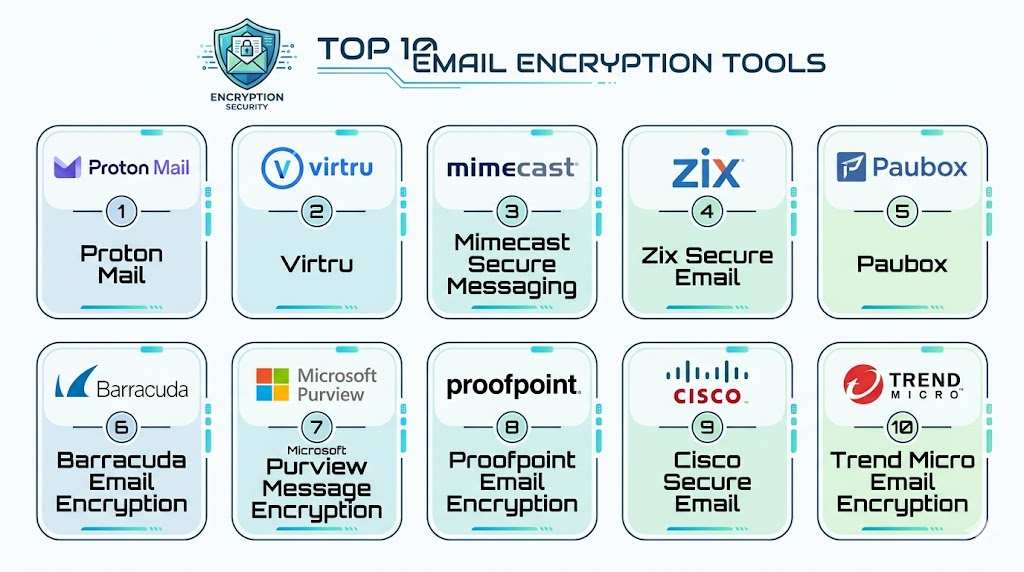
Top 10 Email Encryption Tools
#1 — Proton Mail
Short description: Proton Mail is a privacy-first encrypted email platform offering end-to-end encryption and zero-access architecture. It is widely used by individuals, enterprises, journalists, legal professionals, and privacy-conscious organizations that require strong confidentiality and secure email workflows.
Key Features
- End-to-end encrypted email
- Zero-access encryption architecture
- Password-protected external emails
- OpenPGP compatibility
- Secure mobile and desktop applications
- Custom domain support
- Encrypted attachments and calendars
Pros
- Strong privacy-focused architecture
- Easy encrypted communication workflows
- Good cross-platform support
Cons
- Advanced enterprise workflows may require higher plans
- Subject lines are not fully encrypted
- Some integrations are more limited than Microsoft ecosystems
Platforms / Deployment
- Web
- Windows
- macOS
- Linux
- iOS
- Android
- Cloud
Security & Compliance
- End-to-end encryption
- Zero-access encryption
- OpenPGP support
- MFA support
- GDPR-focused workflows
Integrations & Ecosystem
Proton Mail integrates with privacy-focused productivity and communication environments.
- Proton Drive
- Proton Calendar
- Custom domains
- Email bridge support
- Mobile applications
- OpenPGP workflows
Support & Community
Large privacy-focused community with enterprise support and extensive documentation.
#2 — Virtru Email Encryption
Short description: Virtru provides email encryption and data protection solutions for Gmail and Microsoft 365 environments. It focuses on simple user experiences, policy-based encryption, and secure external email sharing for organizations handling sensitive information.
Key Features
- End-to-end email encryption
- Gmail and Outlook integration
- Secure file sharing
- Data access controls
- Email expiration and revocation
- Audit trails
- Policy-based encryption
Pros
- Easy integration with existing email workflows
- Good external recipient experience
- Strong enterprise usability
Cons
- Advanced governance may require enterprise plans
- Best value inside Microsoft and Google ecosystems
- Pricing can increase with scale
Platforms / Deployment
- Web
- Windows
- macOS
- iOS
- Android
- Cloud
Security & Compliance
- End-to-end encryption
- Access controls
- Audit logging
- SSO support
- Governance workflows
Integrations & Ecosystem
Virtru integrates with enterprise productivity and cloud email ecosystems.
- Gmail
- Google Workspace
- Microsoft 365
- Outlook
- APIs
- Secure collaboration tools
Support & Community
Strong enterprise onboarding and customer success support.
#3 — Proofpoint Email Encryption
Short description: Proofpoint Email Encryption is an enterprise email security and encryption platform designed for organizations needing policy-based encryption, DLP integration, and secure outbound communication workflows. It is commonly used in regulated industries and large enterprises.
Key Features
- Policy-based email encryption
- DLP integration
- Secure web portal delivery
- S/MIME support
- Compliance-focused workflows
- Outbound email protection
- Encryption automation
Pros
- Strong enterprise security ecosystem
- Useful compliance workflows
- Good scalability for large deployments
Cons
- Enterprise-focused complexity
- Requires operational planning
- Smaller businesses may not need full feature depth
Platforms / Deployment
- Web
- Cloud
- Hybrid
Security & Compliance
- SSO support
- Audit logging
- DLP integration
- Governance workflows
- Compliance-focused controls
Integrations & Ecosystem
Proofpoint integrates with enterprise security, email, and compliance systems.
- Microsoft 365
- Exchange
- SIEM systems
- DLP platforms
- APIs
- Security workflows
Support & Community
Strong enterprise support and operational guidance for regulated organizations.
#4 — Cisco Secure Email Encryption
Short description: Cisco Secure Email Encryption is an enterprise-grade encryption solution integrated into Cisco’s broader security ecosystem. It supports secure messaging, policy-driven encryption, and protected communications for large organizations.
Key Features
- Policy-driven encryption
- Secure recipient portals
- TLS and message-level encryption
- Secure email gateway integration
- Compliance workflows
- Reporting and governance
- Enterprise scalability
Pros
- Strong enterprise reliability
- Good Cisco ecosystem integration
- Suitable for regulated industries
Cons
- Enterprise-oriented deployment complexity
- Premium infrastructure requirements
- Smaller organizations may find it excessive
Platforms / Deployment
- Web
- Cloud
- Hybrid
Security & Compliance
- TLS encryption
- Governance workflows
- Audit capabilities
- Access controls
- Enterprise security integration
Integrations & Ecosystem
Cisco integrates with enterprise security and communication environments.
- Cisco Secure Email
- Microsoft 365
- SIEM systems
- APIs
- DLP systems
- Enterprise security tools
Support & Community
Strong enterprise implementation and technical support resources.
#5 — Mimecast Secure Messaging
Short description: Mimecast Secure Messaging combines email encryption with broader email security, continuity, and archiving capabilities. It helps enterprises protect sensitive communications while reducing risks from phishing, malware, and data leakage.
Key Features
- Secure email encryption
- Secure recipient portals
- DLP integration
- Email archiving
- Threat protection
- Compliance workflows
- Secure outbound messaging
Pros
- Strong all-in-one email security approach
- Useful compliance integration
- Good operational scalability
Cons
- Enterprise pricing structure
- Full platform may be more than some teams need
- Advanced administration requires expertise
Platforms / Deployment
- Web
- Cloud
Security & Compliance
- DLP workflows
- Encryption controls
- Audit logging
- Governance features
- Compliance support
Integrations & Ecosystem
Mimecast integrates with enterprise messaging and security systems for centralized email protection.
- Microsoft 365
- Exchange
- SIEM systems
- Security workflows
- APIs
- Compliance tools
Support & Community
Large enterprise customer base with strong onboarding and support resources.
#6 — Zix Secure Email
Short description: Zix Secure Email provides policy-driven email encryption and secure communication workflows for healthcare, finance, legal, and regulated organizations. It focuses on simplified encryption and compliance automation.
Key Features
- Policy-based encryption
- Secure email delivery
- Compliance automation
- DLP support
- Recipient authentication
- Secure portals
- Encryption management
Pros
- Strong compliance-focused workflows
- Useful healthcare and finance support
- Simplified recipient experience
Cons
- Enterprise-oriented pricing
- Less flexible for consumer workflows
- Advanced customization may require support
Platforms / Deployment
- Web
- Cloud
Security & Compliance
- Encryption controls
- Audit support
- Governance workflows
- Compliance-focused capabilities
- Access management
Integrations & Ecosystem
Zix integrates with enterprise email, compliance, and messaging environments.
- Microsoft 365
- Exchange
- Compliance systems
- APIs
- DLP platforms
- Security tools
Support & Community
Strong enterprise support and onboarding for regulated industries.
#7 — PreVeil
Short description: PreVeil provides end-to-end encrypted email and file sharing with strong compliance and zero-knowledge architecture. It is commonly used by organizations requiring highly secure communications and sensitive data protection.
Key Features
- End-to-end encryption
- Zero-knowledge architecture
- Secure file sharing
- Outlook and Gmail integration
- Compliance-focused workflows
- Secure collaboration
- Encryption key management
Pros
- Strong security and privacy posture
- Good compliance capabilities
- Useful for sensitive business communications
Cons
- Premium pricing
- Enterprise deployment planning required
- Less mainstream ecosystem adoption
Platforms / Deployment
- Web
- Windows
- macOS
- iOS
- Android
- Cloud
Security & Compliance
- End-to-end encryption
- Zero-knowledge encryption
- Access controls
- Governance workflows
- Compliance support
Integrations & Ecosystem
PreVeil integrates with enterprise email and collaboration workflows.
- Gmail
- Outlook
- Secure collaboration systems
- File sharing environments
- APIs
- Compliance workflows
Support & Community
Provides enterprise onboarding and secure communication guidance.
#8 — Tuta Mail
Short description: Tuta Mail is a secure email platform offering encrypted email, privacy-first workflows, and open-source security components. It is designed for individuals and organizations seeking simple encrypted communications with strong privacy protections.
Key Features
- End-to-end encryption
- Encrypted calendars and contacts
- Open-source components
- Secure password-protected emails
- Mobile and desktop support
- Privacy-focused workflows
- Custom domains
Pros
- Strong privacy positioning
- Simple user experience
- Good mobile application support
Cons
- Limited enterprise ecosystem integrations
- Some traditional email protocols unsupported
- Advanced business workflows may vary
Platforms / Deployment
- Web
- Windows
- macOS
- Linux
- iOS
- Android
- Cloud
Security & Compliance
- End-to-end encryption
- Privacy-focused architecture
- MFA support
- Open-source security workflows
Integrations & Ecosystem
Tuta Mail focuses on privacy-first communication workflows with lightweight integrations.
- Mobile apps
- Custom domains
- Secure communication workflows
- Privacy-focused ecosystems
- APIs
- Productivity tools
Support & Community
Active privacy-focused community and user support ecosystem.
#9 — Microsoft Purview Message Encryption
Short description: Microsoft Purview Message Encryption provides secure email encryption and rights management inside Microsoft 365 environments. It helps organizations protect sensitive communications while supporting enterprise compliance and governance workflows.
Key Features
- Message encryption
- Rights management controls
- Policy-based encryption
- Outlook integration
- Compliance workflows
- Secure external email delivery
- Governance and auditing
Pros
- Strong Microsoft ecosystem integration
- Good enterprise governance support
- Useful compliance automation
Cons
- Best suited for Microsoft environments
- Configuration complexity may vary
- Licensing structure can be complex
Platforms / Deployment
- Web
- Windows
- macOS
- iOS
- Android
- Cloud
Security & Compliance
- SSO support
- RBAC controls
- Governance workflows
- Audit logging
- Compliance-focused capabilities
Integrations & Ecosystem
Microsoft Purview integrates deeply with Microsoft productivity, compliance, and identity systems.
- Microsoft 365
- Outlook
- Exchange
- Azure Active Directory
- DLP systems
- Compliance tools
Support & Community
Large enterprise ecosystem with extensive documentation and enterprise support resources.
#10 — Paubox
Short description: Paubox is a secure email platform designed primarily for healthcare organizations and businesses requiring HIPAA-compliant encrypted email workflows. It emphasizes ease of use and seamless encrypted communication without requiring portals or plugins.
Key Features
- Automatic email encryption
- HIPAA-focused workflows
- Secure outbound messaging
- Microsoft 365 integration
- Threat protection
- Email filtering
- Compliance support
Pros
- Easy-to-use encrypted email workflows
- Strong healthcare focus
- No portal requirement for recipients
Cons
- Best suited for healthcare and SMB workflows
- Less customizable than larger enterprise platforms
- Advanced enterprise governance may vary
Platforms / Deployment
- Web
- Cloud
Security & Compliance
- Encryption workflows
- HIPAA-focused controls
- Threat protection
- Access management
- Compliance support
Integrations & Ecosystem
Paubox integrates with healthcare and business email ecosystems for secure communication workflows.
- Microsoft 365
- Google Workspace
- Healthcare workflows
- APIs
- Security tools
- Email filtering systems
Support & Community
Strong SMB and healthcare-focused onboarding and support resources.
Comparison Table
| Tool Name | Best For | Platform(s) Supported | Deployment | Standout Feature | Public Rating |
|---|---|---|---|---|---|
| Proton Mail | Privacy-focused secure email | Web / Desktop / Mobile | Cloud | Zero-access encryption | N/A |
| Virtru Email Encryption | Gmail and Microsoft encryption | Web / Desktop / Mobile | Cloud | Seamless email integration | N/A |
| Proofpoint Email Encryption | Enterprise compliance workflows | Web | Cloud / Hybrid | Policy-based encryption | N/A |
| Cisco Secure Email Encryption | Large enterprise security | Web | Cloud / Hybrid | Cisco security ecosystem | N/A |
| Mimecast Secure Messaging | Email security and encryption | Web | Cloud | Combined security and encryption | N/A |
| Zix Secure Email | Regulated industries | Web | Cloud | Compliance automation | N/A |
| PreVeil | High-security communications | Web / Desktop / Mobile | Cloud | Zero-knowledge encryption | N/A |
| Tuta Mail | Privacy-first secure email | Web / Desktop / Mobile | Cloud | Open-source encrypted email | N/A |
| Microsoft Purview Message Encryption | Microsoft 365 organizations | Web / Desktop / Mobile | Cloud | Rights management integration | N/A |
| Paubox | Healthcare encrypted email | Web | Cloud | Portal-free encrypted delivery | N/A |
Evaluation & Scoring of Email Encryption Tools
| Tool Name | Core 25% | Ease 15% | Integrations 15% | Security 10% | Performance 10% | Support 10% | Value 15% | Weighted Total |
|---|---|---|---|---|---|---|---|---|
| Proton Mail | 9.2 | 8.7 | 7.8 | 9.5 | 8.8 | 8.5 | 8.8 | 8.8 |
| Virtru Email Encryption | 8.9 | 9.0 | 9.0 | 8.8 | 8.7 | 8.6 | 8.4 | 8.8 |
| Proofpoint Email Encryption | 9.1 | 7.5 | 8.8 | 9.2 | 9.0 | 8.8 | 7.8 | 8.6 |
| Cisco Secure Email Encryption | 9.0 | 7.3 | 8.9 | 9.1 | 9.1 | 8.8 | 7.7 | 8.5 |
| Mimecast Secure Messaging | 8.9 | 7.8 | 8.7 | 8.9 | 8.9 | 8.7 | 8.0 | 8.5 |
| Zix Secure Email | 8.7 | 8.2 | 8.3 | 8.9 | 8.6 | 8.5 | 8.2 | 8.5 |
| PreVeil | 9.0 | 7.7 | 8.0 | 9.5 | 8.7 | 8.3 | 7.9 | 8.5 |
| Tuta Mail | 8.4 | 8.8 | 7.2 | 9.2 | 8.5 | 8.2 | 8.8 | 8.4 |
| Microsoft Purview Message Encryption | 9.0 | 8.0 | 9.2 | 9.0 | 9.0 | 8.8 | 8.1 | 8.8 |
| Paubox | 8.5 | 9.0 | 8.0 | 8.8 | 8.5 | 8.4 | 8.7 | 8.5 |
These scores are comparative rather than absolute. Privacy-focused platforms generally score higher in encryption strength and confidentiality, while enterprise-focused platforms perform better in governance, compliance, and integrations. Organizations should prioritize the categories that best align with their security requirements, compliance obligations, and operational workflows.
Which Email Encryption Tool Is Right for You?
Solo / Freelancer
Individuals and freelancers generally benefit from easy-to-use encrypted email services such as Proton Mail or Tuta Mail because they combine privacy, usability, and secure communication without requiring complex enterprise administration.
SMB
SMBs often need simple encrypted email workflows that integrate with existing productivity platforms. Virtru, Paubox, Microsoft Purview Message Encryption, and Proton Mail provide practical security without excessive operational complexity.
Mid-Market
Mid-market organizations usually require stronger compliance workflows, governance, and integration capabilities. Mimecast, Zix, Virtru, and Microsoft Purview provide balanced scalability and operational usability.
Enterprise
Large enterprises should evaluate Proofpoint, Cisco Secure Email Encryption, Microsoft Purview, Mimecast, or PreVeil depending on whether their priority is compliance, governance, threat protection, or high-security communications.
Budget vs Premium
Budget-conscious organizations can begin with secure email providers or lightweight encryption add-ons. Premium enterprise platforms provide stronger DLP integration, governance, audit logging, and large-scale operational support.
Feature Depth vs Ease of Use
Proton Mail and Paubox prioritize simplicity and usability, while Proofpoint, Cisco, and Microsoft Purview provide deeper enterprise governance and compliance functionality.
Integrations & Scalability
Organizations heavily invested in Microsoft 365 or Google Workspace should prioritize tools with native ecosystem integrations. Enterprises with broader security operations may benefit from platforms integrated with SIEM, DLP, and governance systems.
Security & Compliance Needs
Healthcare, finance, government, and legal organizations should prioritize audit logging, encryption standards support, DLP integration, governance workflows, and secure external communication capabilities.
Frequently Asked Questions
1. What is an Email Encryption Tool?
An Email Encryption Tool protects email content and attachments using encryption technologies so only authorized recipients can read the messages.
2. Why is email encryption important?
Email encryption helps prevent unauthorized access, interception, data breaches, and exposure of sensitive business or personal information during email transmission and storage.
3. What is end-to-end encryption?
End-to-end encryption ensures that emails are encrypted on the sender’s device and can only be decrypted by the intended recipient.
4. What is the difference between TLS and end-to-end encryption?
TLS encrypts emails during transmission between servers, while end-to-end encryption protects the message contents so even the provider cannot access them.
5. Are Email Encryption Tools useful for small businesses?
Yes. Small businesses handling contracts, financial records, customer information, or healthcare data can significantly improve security and compliance using encrypted email workflows.
6. Can encrypted emails be sent to external recipients?
Yes. Many tools support secure portals, password-protected emails, or secure recipient workflows that allow encrypted communication with external users.
7. Are Email Encryption Tools difficult to use?
Modern tools are much easier to use than traditional PGP-only systems. Many platforms now automate encryption and integrate directly into Gmail or Outlook workflows.
8. Are Email Encryption Tools compliant with regulations?
Many enterprise tools support compliance workflows for regulations involving healthcare, financial services, and privacy protection, though organizations must configure them correctly.
9. What are common implementation challenges?
Common challenges include recipient usability, key management, integration complexity, user adoption, and balancing security with operational convenience.
10. What are alternatives to Email Encryption Tools?
Alternatives include secure collaboration platforms, encrypted messaging systems, secure file sharing platforms, and customer portals, though email remains necessary for many business workflows.
Conclusion
Email Encryption Tools are essential for organizations and individuals that need to protect sensitive communications against interception, breaches, phishing risks, and compliance failures. The best platform depends on security requirements, operational complexity, ecosystem alignment, and user experience priorities. Privacy-focused users may prefer Proton Mail or Tuta Mail for strong confidentiality and simplicity, while enterprises may benefit more from Proofpoint, Cisco Secure Email Encryption, Mimecast, Microsoft Purview, or Virtru because of their governance, compliance, and integration capabilities. Healthcare and regulated organizations may find Paubox or Zix especially practical for secure external communications. Instead of choosing based only on encryption strength, organizations should evaluate usability, recipient experience, governance workflows, integration maturity, and operational scalability before standardizing on an email encryption strategy.