Published: November 2026
Category: GST Updates | GST Registration | Business Compliance
Applicable Country: India
What Is GST Multi-State Registration?
If your business operates in multiple Indian states, you probably know that managing GST registration separately for each state can be time-consuming.
For example, imagine your company has its head office in Jharkhand and also operates offices or business locations in Maharashtra, Karnataka, Delhi and West Bengal.
Previously, you had to complete separate GST registration applications for each state and repeatedly enter common business information.
To make this process easier, the Goods and Services Tax Network (GSTN) introduced a new facility called Multi-State Registration on 1 October 2026.
This facility allows eligible businesses to initiate GST registration applications for multiple states or Union Territories under the same PAN through a common process.
The biggest advantage is that you can submit your common business information once instead of entering the same details repeatedly for every state.
In this guide, we will explain everything in simple language, including eligibility, documents, the registration process, important deadlines and practical examples.
1. What Is Multi-State GST Registration?
Multi-State GST Registration is a facility available on the official GST Portal that allows eligible taxpayers to apply for GST registration in multiple states or Union Territories under the same PAN.
The facility uses a common registration process to reduce repetitive data entry.
Let’s understand with an example.
Suppose ABC Technologies Private Limited is registered in Jharkhand and wants to expand its operations into four additional states.
The company requires GST registrations in:
- Jharkhand
- Maharashtra
- Karnataka
- Delhi
- West Bengal
Instead of repeatedly entering common company information for every state, the company can use the Multi-State Registration facility.
The portal generates one Master Temporary Reference Number (Master TRN), which is used to submit the common registration information.
After submission, the portal generates separate TRNs for the individual state applications.
The company then completes the remaining state-specific details for each application.
Important: Multi-State Registration does not provide one GSTIN for all states. Each state or Union Territory continues to have its own GST registration and GSTIN, where registration is required and approved.
2. Who Can Use the Multi-State Registration Facility?
According to GSTN Advisory No. 674 dated 1 October 2026, this facility is currently available to Normal Taxpayers seeking GST registration in more than one state or Union Territory under the same PAN.
Eligibility at a glance
| Particulars | Details |
|---|---|
| Applicant | Eligible Normal Taxpayer |
| PAN requirement | Same PAN for all applications |
| Registration coverage | Multiple states or Union Territories |
| Portal facility | Multi-State Registration |
| Common reference | Master TRN |
| Individual applications | Separate TRNs for each selected state |
| Common information | Submitted once |
| State-specific information | Submitted separately |
The facility is currently limited to Normal Taxpayers. Applicants belonging to other registration categories should use the applicable registration process.
Who may benefit from this facility?
- Companies operating in multiple states.
- Businesses expanding their operations.
- Organisations establishing offices in different states.
- Service providers with multiple business locations.
- Eligible businesses requiring GST registration in several states.
Note: Having customers in another state does not automatically mean that a separate GST registration is required there. Registration requirements depend on the nature of the business, place of supply, establishment and applicable GST provisions.
3. What Is a Master TRN?
Before starting the registration process, it is important to understand the term Master TRN.
TRN stands for Temporary Reference Number.
A Master TRN is a common reference number generated by the GST Portal after an applicant selects the required states or Union Territories through the Multi-State Registration facility.
It allows the applicant to submit Common Registration Information (CRI) for all the selected states.
How does the process work?
Step 1: Select the required states or Union Territories.
Step 2: The GST Portal generates a Master TRN.
Step 3: Use the Master TRN to enter common business information.
Step 4: Submit the Common Registration Information within 15 days.
Step 5: The portal generates individual TRNs for each selected state.
Step 6: Complete the remaining state-specific information.
Step 7: Submit each individual registration application.
The Master TRN reduces repetitive data entry and makes the initial registration process easier.
4. Documents and Information Required for Multi-State Registration
Before starting the application, keep your business documents ready.
Preparing the documents in advance will make the registration process smoother.
A. Common business documents
| Document | Purpose |
|---|---|
| Company PAN | Business identification |
| Certificate of Incorporation | Company registration proof |
| Business constitution details | Legal structure of the business |
| Director details | Promoter information |
| Authorised signatory details | Application authorisation |
| Authorised representative details | Representation, where applicable |
| HSN/SAC details | Goods and services classification |
B. State-specific documents
Each state application requires its own business location information.
You may need:
- Principal Place of Business address.
- Additional Place of Business details, where applicable.
- Rent agreement, where applicable.
- Electricity bill or other accepted address proof.
- Ownership documents, where applicable.
- Supporting documents establishing the right to use the premises.
- State-specific business information.
C. Other information
Keep the following details ready:
- Mobile number and email address.
- Bank account information, where required.
- Aadhaar details for authentication, where required.
- Digital Signature Certificate (DSC), where applicable.
- Details of the authorised signatory.
The exact documents depend on the business structure, premises and verification requirements.
5. How to Apply for Multi-State GST Registration: Step-by-Step Tutorial
Now let’s understand the actual registration process.
You can follow these steps on the official GST Portal.
Step 1: Open the Official GST Portal
Visit: Gst.gov.in
Open the GST Portal homepage.
At the top of the homepage, you will find three important options:
- Register
- Multi-State Registration
- Login
Click on MULTI-STATE REGISTRATION.
This is the option introduced for businesses applying for GST registration in multiple states.
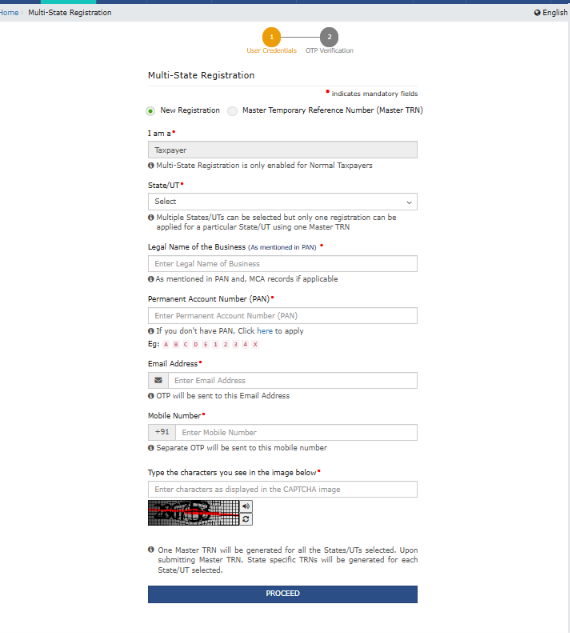
Step 2: Select the Required States
After opening the Multi-State Registration option, select the states or Union Territories where your business requires GST registration.
For example, suppose your company requires registration in:
- Jharkhand
- Karnataka
- Maharashtra
- Delhi
Select the relevant states.
Before proceeding, verify that you have a valid business requirement for registration in every selected state.
Step 3: Generate the Master TRN
After selecting the required states and completing the initial information requested by the portal, a Master Temporary Reference Number (Master TRN) is generated.
This number is important because it allows you to access the common registration process.
Important: Save the Master TRN securely. You will need it to continue the application.
Step 4: Submit Common Registration Information (CRI)
Now use the Master TRN to provide your Common Registration Information.
This is one of the biggest advantages of the new facility.
Instead of repeatedly entering the same information for every state, you can provide the common information through a single process.
The common information includes:
1. Business Details
Provide details such as:
- Legal name of the business.
- PAN.
- Business constitution.
- Other relevant business information.
2. Promoter or Partner Details
Provide the required information about the company’s promoters, directors, partners or other relevant persons.
3. Authorised Signatory
Provide the details of the person authorised to submit the GST registration application.
4. Authorised Representative
Enter the details of an authorised representative, where applicable.
5. Goods and Services
Provide the relevant HSN and SAC information for the goods or services supplied by the business.
Review all information carefully before submitting the Common Registration Information.
Important: 15-Day Deadline
The Common Registration Information under the Master TRN must be submitted within 15 days of generating the Master TRN.
Do not leave the application incomplete until the last day.
Step 5: Generate Individual State TRNs
Once the Common Registration Information is submitted successfully, the GST Portal generates separate TRNs for each selected state or Union Territory.
For example:
| State | Registration Reference |
|---|---|
| Jharkhand | Individual TRN 1 |
| Karnataka | Individual TRN 2 |
| Maharashtra | Individual TRN 3 |
| Delhi | Individual TRN 4 |
The common information already submitted will be automatically populated in the respective applications.
This information remains editable.
Step 6: Complete State-Specific Information
This is an important step.
Although the common business information is submitted once, each state still requires its own business location details.
For every individual TRN, provide the following information:
A. Principal Place of Business (PPoB)
Enter the main business address for that particular state.
B. Additional Place of Business (APoB)
If your company has additional business locations in that state, provide the required details.
C. State-Specific Information
Complete the additional information requested for the individual state application.
D. Aadhaar Authentication
Complete Aadhaar authentication wherever required by the GST registration process.
Review the information before moving to the next step.
Step 7: Review the Individual Applications
Before submitting the applications, verify the following:
- Correct business name.
- Correct PAN.
- Correct state selection.
- Correct Principal Place of Business.
- Correct Additional Place of Business.
- Correct director or promoter details.
- Correct authorised signatory.
- Correct HSN/SAC details.
- Valid supporting documents.
Remember that common information is editable in the individual state applications.
Step 8: Submit Each State Application
After completing the state-specific information, submit the respective applications using the prescribed authentication and signature method.
Depending on the applicant’s constitution, the portal may require DSC, EVC or another permitted authentication method.
Each application is submitted and processed separately.
Step 9: Track the Application Status
After submission, keep the acknowledgement details and Application Reference Number (ARN) safely.
You can track the application status through the GST Portal.
Visit: https://www.gst.gov.in
Navigate to the registration-related application tracking facility and enter the relevant reference details.
The GST authorities may process each application independently and may request additional information where necessary.
Step 10: Download the GST Registration Certificate
Once an individual application is approved, the GST registration certificate becomes available on the portal.
Download the certificate and verify:
- Legal business name.
- GSTIN.
- State.
- Principal Place of Business.
- Registration effective date.
- Other registration particulars.
Repeat this process for each approved state registration.
6. Practical Example: A Company Applying for GST Registration in Five States
Let’s understand the entire process with a practical example.
Suppose ABC Technologies Private Limited operates from Jharkhand and is expanding its business into four additional states.
The company wants GST registration in five states.
Business information
| Particulars | Details |
|---|---|
| Company Name | ABC Technologies Private Limited |
| Business Type | Private Limited Company |
| PAN | Same company PAN |
| Head Office | Jharkhand |
| Additional States | Karnataka, Maharashtra, Delhi, West Bengal |
| Total Registrations | 5 |
How the company will use the new facility
- Visit the GST Portal.
- Click Multi-State Registration.
- Select all five states.
- Generate the Master TRN.
- Submit common business information.
- Receive five individual TRNs.
- Enter state-specific business addresses.
- Upload supporting documents.
- Complete the required Aadhaar authentication.
- Submit each individual application.
- Track the applications.
- Download individual GST certificates after approval.
What is the main advantage?
The company does not need to repeatedly enter all common business information for every state application.
However, it still needs to provide valid location details and complete each individual application.
7. Difference Between Normal GST Registration and Multi-State Registration
| Particulars | Normal Registration | Multi-State Registration |
|---|---|---|
| Application process | Individual application | Common initiation process |
| Common business information | Entered separately | Submitted once |
| State selection | One state per application | Multiple states selected together |
| Reference number | Individual TRN | Master TRN followed by individual TRNs |
| State-specific details | Required | Required |
| GSTIN | State-specific | State-specific |
| Approval | Individual processing | Individual processing |
The main difference is the reduction in repetitive data entry.
Multi-State Registration does not remove the legal requirement for separate state-wise GST registrations.
8. Important Points to Remember Before Applying
Before using the Multi-State Registration facility, remember these points:
1. Same PAN is required
The applications must be made under the same PAN.
2. Currently available for Normal Taxpayers
The GSTN advisory states that the facility is currently available only for Normal Taxpayers.
3. Submit the Master TRN within 15 days
The Common Registration Information must be submitted within the prescribed 15-day period.
4. Separate state-wise GSTINs
Each state registration receives its own GSTIN after approval.
5. Valid business address is necessary
A business should have the appropriate premises and supporting documents for every state registration.
6. State-specific details are still required
The Principal Place of Business, Additional Place of Business and other state information must be completed separately.
7. Individual approval is required
Generating a TRN does not mean that GST registration has been approved.
8. Registration is not automatically required in every state where you have customers
Check the applicable GST registration requirements before applying.
9. Benefits of Multi-State GST Registration
The new facility offers several practical benefits.
1. Less Repetitive Data Entry
Businesses can submit common registration information once instead of entering the same details repeatedly.
2. Saves Administrative Time
The common registration process makes it easier to initiate multiple applications.
3. Better Registration Management
Businesses can initiate registration applications for several states through a common facility.
4. Easier Business Expansion
Companies expanding into multiple states can use a more streamlined application process.
5. Better User Experience
The facility reduces repetitive work and makes the registration process more convenient.
10. Frequently Asked Questions (FAQs)
Q1. What is Multi-State GST Registration?
Multi-State GST Registration is a facility introduced by GSTN that allows eligible Normal Taxpayers to initiate GST registration applications in multiple states or Union Territories under the same PAN through a common process.
Q2. When was the Multi-State Registration facility introduced?
The facility was introduced through GSTN Advisory No. 674 dated 1 October 2026.
Q3. Who can use this facility?
Currently, it is available for Normal Taxpayers seeking registration in more than one state or Union Territory under the same PAN.
Q4. What is a Master TRN?
A Master TRN is a common temporary reference number generated after selecting the required states or Union Territories. It is used to submit Common Registration Information.
Q5. What is the validity or submission deadline for the Master TRN?
The Common Registration Information under the Master TRN must be submitted within 15 days of its generation.
Q6. Will I receive one GSTIN for all states?
No. Each state or Union Territory receives a separate GSTIN after the respective application is approved.
Q7. Do I need to enter business details separately for every state?
No. Common business information is submitted once and automatically populated in the individual state applications. It remains editable.
Q8. Do I need to provide a separate business address for each state?
Yes. You must provide the required Principal Place of Business and Additional Place of Business information for each state application.
Q9. Does generating a Master TRN mean my GST registration is approved?
No. It only allows you to proceed with the common registration process. Each individual state application must be completed and approved.
Q10. Can I use this facility for different companies with different PANs?
No. The facility is intended for multiple state applications under the same PAN.
Q11. Can I edit common business information after it has been submitted?
The GSTN advisory states that common information is automatically populated in individual state applications and remains editable there.
Q12. Where can I apply for Multi-State GST Registration?
Visit the official GST Portal:
Click the Multi-State Registration option available on the homepage.
11. Official GST Resources
For accurate information and the latest updates, always refer to official government websites.
1. GST Portal
Use this website for registration, return filing, payments and application tracking.
2. GSTN Multi-State Registration Advisory
https://www.gst.gov.in/newsandupdates/read/674
Refer to GSTN Advisory No. 674 dated 1 October 2026 for the official details of this facility.
3. Central Board of Indirect Taxes and Customs (CBIC)
Refer to CBIC for GST laws, notifications, circulars and registration rules.
4. GST Council
Refer to the GST Council website for GST policy developments and recommendations.
Conclusion: A Simpler Way to Apply for GST Registration in Multiple States
The introduction of Multi-State Registration is a useful improvement for businesses that need GST registration in multiple states.
Earlier, businesses had to repeatedly enter common information while preparing separate registration applications.
With the new facility, eligible taxpayers can submit common business information through one Master TRN and then complete the individual state applications.
The process still requires separate state-wise details, supporting documents and approval, but it reduces repetitive data entry and makes the initial registration process more convenient.
If your company is planning to expand into multiple Indian states, understanding this facility can help you organise your GST registration process more efficiently.
The key takeaway is simple: One common registration process, multiple state-specific applications and separate GSTINs for each approved state registration.
Disclaimer
This article is intended for general educational and informational purposes. It is based on GSTN Advisory No. 674 dated 1 October 2026.
GST registration requirements depend on the nature of business activities, place of supply, applicable provisions and registration conditions.
Applicants should verify the latest instructions on the official GST Portal and consult a qualified Chartered Accountant or GST professional before submitting registration applications.
Official Reference: Goods and Services Tax Network (GSTN), Advisory No. 674 – Advisory on “Multistate Registration” Facility for GST Registration, dated 1 October 2026.